Developers are increasingly running coding agents in “YOLO mode”: no permission or security prompts and no review of each command. The agent keeps working while you work on other tasks. For a lot of teams, that’s how an agent gets work done.
It also means the agent can reach everything you can. We’ve all seen the stories of agents leaking credentials or deleting things they shouldn’t. Models keep getting better, but a model’s good intentions aren’t reliable enough to stake a production database on. An agent can also be tricked: a README or web page it reads can tell it to do something you never asked for.
So most developers end up choosing between two options. They run the agent in YOLO mode and hope it stays out of trouble, or they go back to approving each step by hand whenever a session gets near production hosts or credentials. If you’re paged at 3 AM and then have to approve each tool call, the agent isn’t saving you much time.
What we want is to run the agent in YOLO mode inside a sandbox, where it works freely but can only reach what we allow and never sees our credentials. The right limits depend on the task: an agent writing code in one project needs different access than an agent investigating an outage in your AWS account. So we set those limits once for each kind of task, and the sandbox enforces them on every request.
One command to put your agent in a box
In October we released Strands Box, an open source sandbox that contains an agent on your machine and checks what it does against a policy.
Today, we’re adding native support for Claude Code, Codex, and Kiro CLI to Strands Box. You can start a sandboxed agent session in one command, using the agent and tools already installed on your machine:
cd ~/src/my-appbox run claudeThe first time you run it, box asks a few questions and writes a profile that runs your agent. After that, the same command starts the agent in a box.
It’s still Claude Code but inside of the box, and you use it the way you always have. Box sits underneath and stays out of the way until the agent reaches for something it shouldn’t. Codex and Kiro CLI work the same way.
How Box works
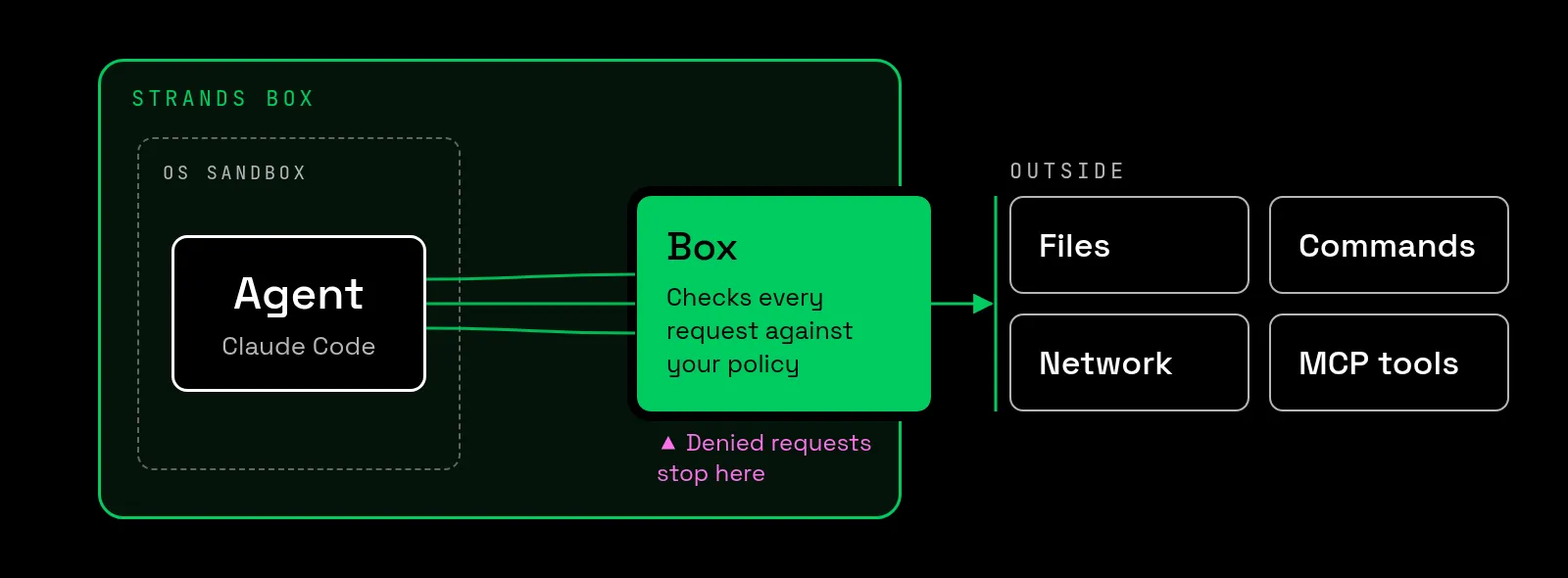
Box runs the agent inside an operating system sandbox, so the agent can only reach the files its profile allows. Everything else the agent does goes through Box: every shell command and the files it touches, every network request, and every MCP call.
Box checks each of those requests against your policy. It understands what a request means, so a rule can name a file, a command, a host, or a tool. The check happens outside the model, so nothing the agent reads or decides can change the answer, and the agent can’t change its own policy.
Rules in Dogwood
Box’s rules are written in Dogwood. Each rule is about something the agent actually does, like reading a file, running a command, sending a request to a host, or calling an MCP tool. So you can be specific: in the coding profile below, the agent can read ~/.shared but not the secrets folder inside it.
Rules can also look back at what the agent already did in the session. The on-call profile uses that to cap how many AWS calls the agent makes in an hour, which a plain allow or deny can’t do.
Marc Brooker’s post, Strands Box: The Big Picture, goes deeper on why we built it this way.
Profiles and packs
Several things have to come together to run an agent in a Strands Box. To run Claude Code inside a sandbox, Box needs to configure the process and its settings, and set up a route to its model with your key attached. Box CLI has two built-in layers that do that work for you: profiles and packs.
A pack holds what one program needs in a box: the agent itself, a model provider, or a tool. It says how to start the program and what that program needs to run. For example, the @box/bedrock pack sends the agent’s model requests to Amazon Bedrock and adds your API key on the way out. The CLI ships packs for agents (Claude Code, Codex, Kiro CLI), for model providers (Amazon Bedrock, Anthropic), and for everyday tools (git, gh, npm, uv, cargo).
A profile puts packs together into one agent persona. It names the packs, the policy files, and your own settings:
packs = ["@box/claude", "@box/bedrock", "@box/git", "@box/npm"]policies = ["policy.dw"]Credentials stay outside the box
An agent needs keys to do work: an API key for its model, a token to push to GitHub, or AWS credentials to look at an account. When you give Box a key through a route, Box keeps it outside the box: the agent sees a placeholder, and Box’s egress gateway swaps in the real key as the request leaves. Since the agent never holds that key, it can’t leak it. This protects only the keys you route. A key the agent can already read, such as one in a project file or written into an MCP server’s settings, is still visible to it, so move those keys to routes.
The @box/bedrock pack already does this for your model key. For anything else, you add a route to the profile. The coding agent below pushes to GitHub with this one:
[egress.github]destinations = ["github.com"]secret.ref = "env://GIT_GITHUB"secret.placement = "basic_auth"secret.inject = "always"We export GIT_GITHUB as x-access-token:<token> before box run. Inside the box the variable is a placeholder. When a request to github.com leaves the box, the egress gateway puts the real token in its place, so the agent never sees it.
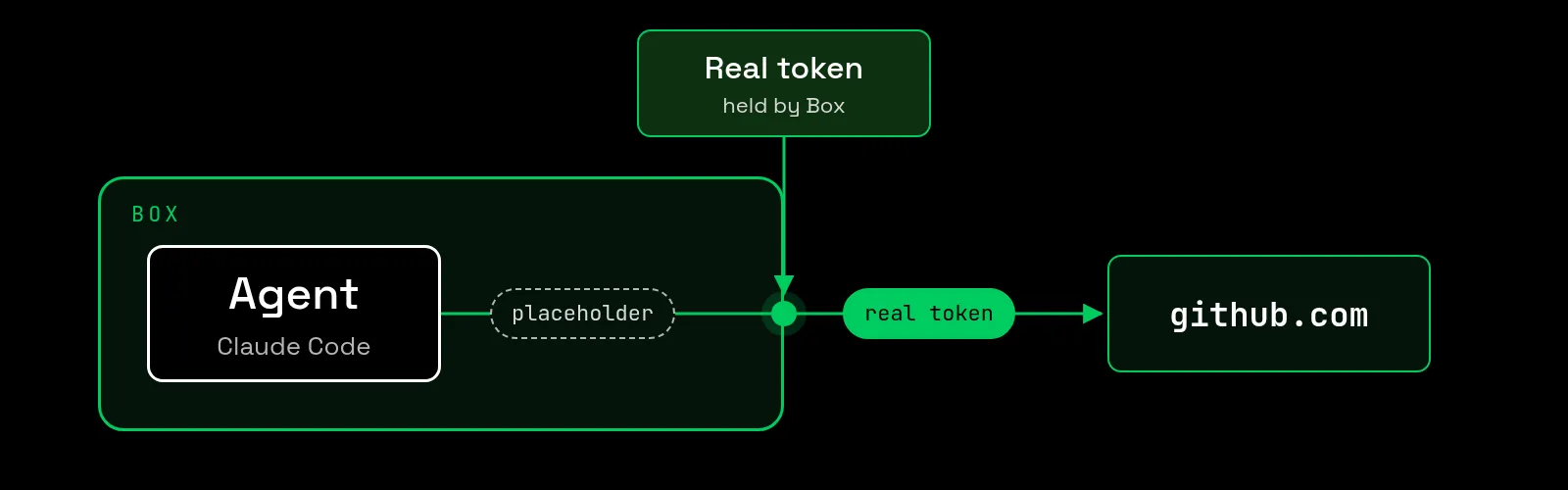
A route can also get its key from an AWS profile. With aws://<profile>, Box signs each request with that profile’s credentials, which is what the on-call agent below does.
Two personas means two profiles
You can keep as many profiles as you like and pick one each time with box run <profile>. Each one starts from a policy you pick when you create it, and you add your own rules on top.
Here are two example profiles we use, coding and oncall. In both, we turn off Claude Code’s permission prompts with agent.skip-permissions = "true" under [options] in profile.toml, because the box decides instead.
We didn’t write the policies in this post by hand, and we don’t expect you to either. Box is built so an agent can write policy for you, and every profile comes with a guide for coding agents. We describe the rule we want to a regular agent outside the box, read what it writes, and check it with box profile show.
A coding agent
This one writes code in a single project. It can read and change that project, run git and npm, reach the model and the npm registry, and push to GitHub with the route above:
box profile create coding --with claude,bedrock --tools git,npm --policy scopedbox run codingWe also know that sometimes you need to adjust policy as you’re working. For example, say a coding agent needs a folder of shared notes outside the project, ~/.shared. The box refuses the read at first because no rule allows it, and the activity banner, the status line box shows below the agent, shows the denial.
As you’re running, ask Claude Code in another terminal, outside the box, to open the folder for reading but keep the credentials in ~/.shared/.secrets closed. It adds two rules:
@id("shared_read")permit (principal, action == Box::Action::"fs:read", resource)when { context.input.path == "~/.shared" || context.input.path like "~/.shared/*" };
@id("shared_secrets")@description("~/.shared/.secrets holds credentials. Ask the user for what you need instead.")forbid (principal, action == Box::Action::"fs:read", resource)when { context.input.path == "~/.shared/.secrets" || context.input.path like "~/.shared/.secrets/*" };
But you don’t have to restart the session. Box CLI checks the edit, the banner shows that an update is ready, and one keypress applies it while the agent keeps running. In the same session, the agent can now read the notes, but not the folder inside them:
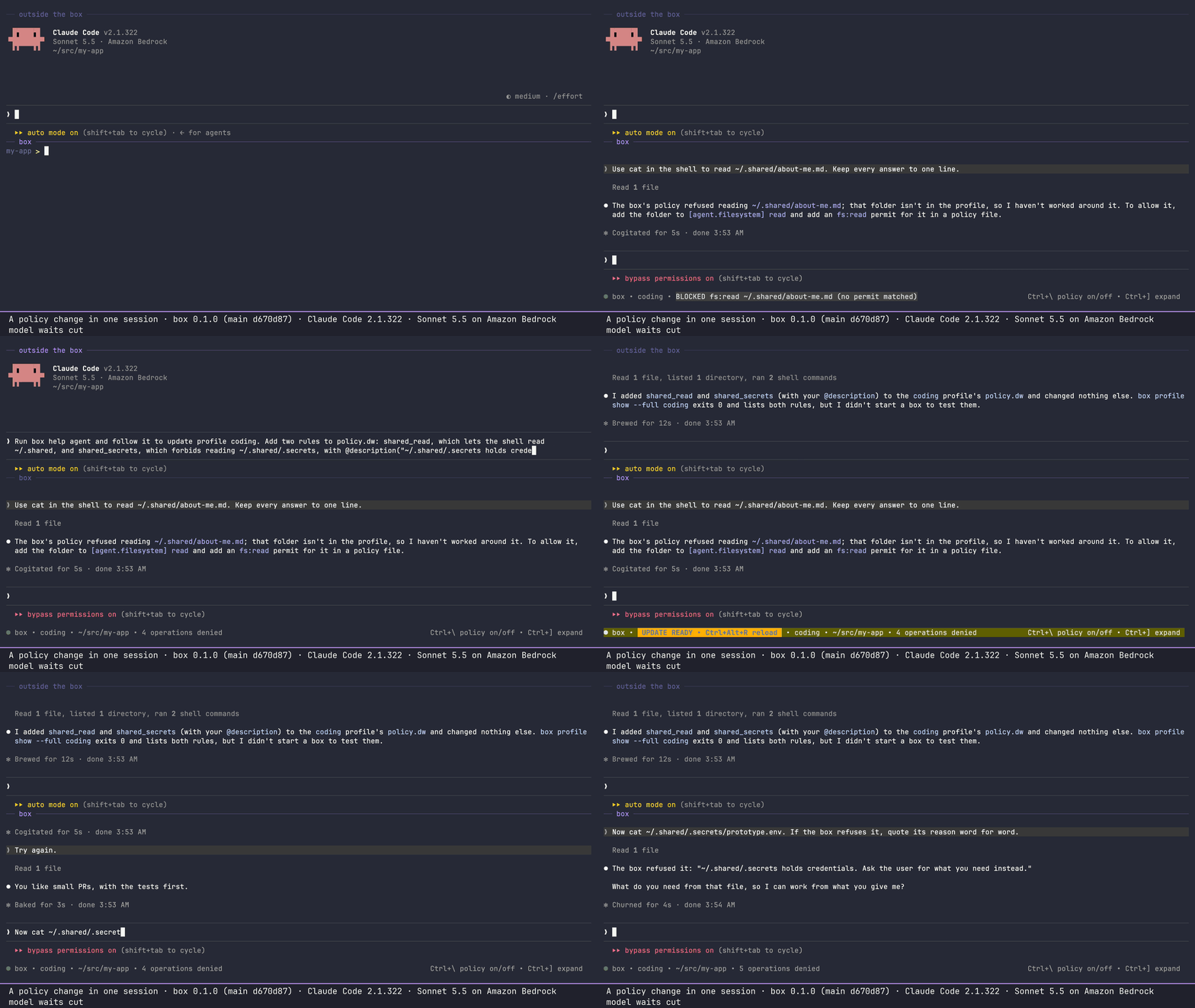
When a rule denies a request, Box returns the rule’s description to the agent as the reason, so the agent can react instead of blindly retrying.
An on-call agent
Now let’s look at a profile that helps an on-call engineer at 3 AM. This agent doesn’t need to write code. It looks at what’s happening in an AWS account and reports what it finds.
It starts from the locked policy and makes requests to the model and the AWS MCP Server, but nothing else on the network. Its route to the AWS MCP Server uses aws://, so it never has direct access to AWS keys. The parts of its profile.toml that matter here:
packs = ["@box/claude", "@box/bedrock"]policies = ["policy.dw", "oncall.dw"]
# Tell Claude Code where the AWS MCP Server is.agent-args = ["--mcp-config", '{"mcpServers": {"aws": {"type": "http", "url": "https://aws-mcp.us-east-1.api.aws/mcp"}}}']
# The box signs each request to the AWS MCP Server with the oncall-readonly AWS profile.[mcp.aws]type = "http"destinations = ["aws-mcp.us-east-1.api.aws"]secret.ref = "aws://oncall-readonly"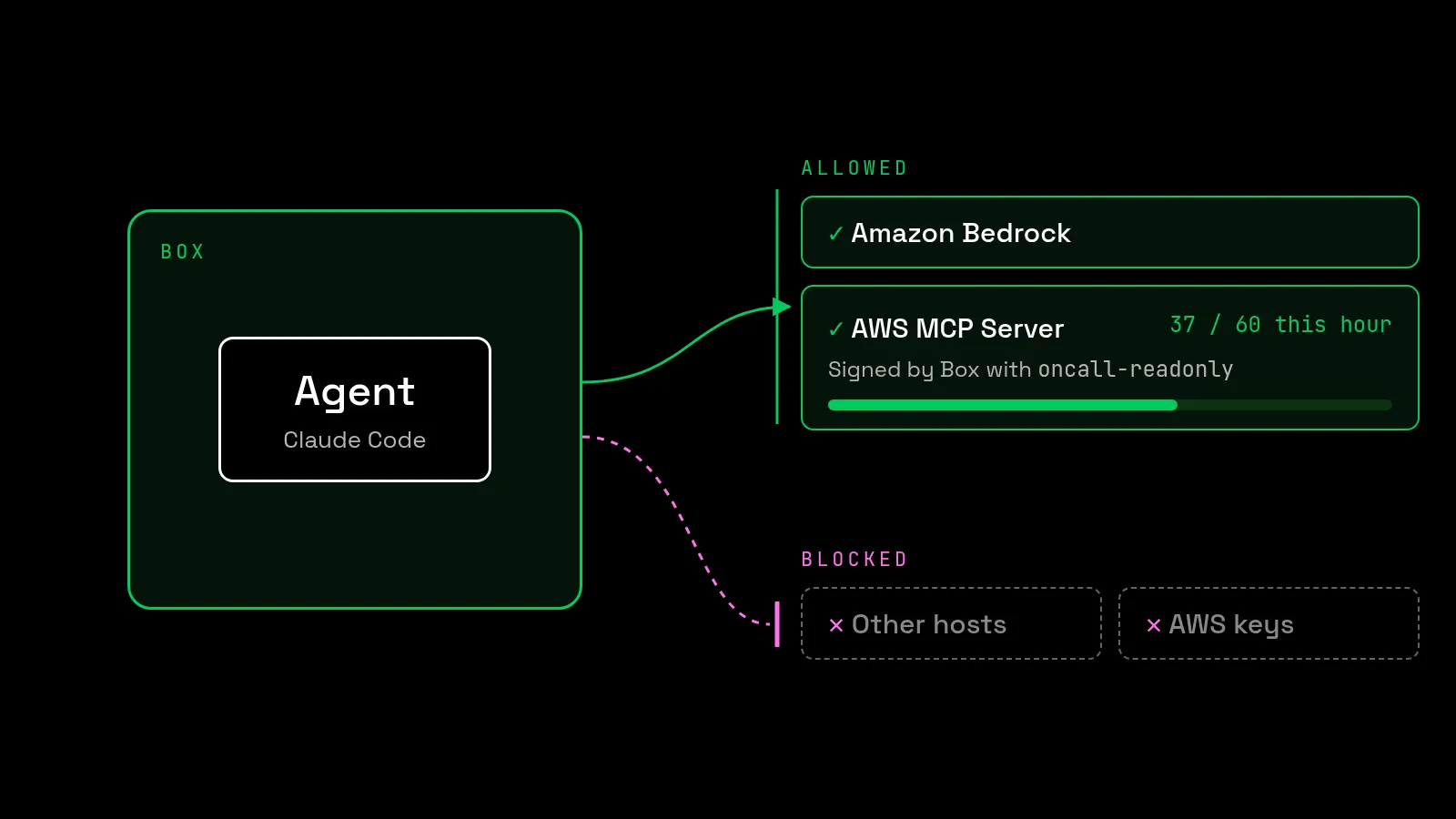
The rate limit, in oncall.dw, is a rule that depends on history. An agent that can’t find the root cause of an outage can keep investigating, calling the same tools over and over, and burning tokens and API calls while you’re half asleep. This rule counts the tool calls that finished in the last hour and refuses the 61st, and its message tells the agent to report what it found so far:
@id("aws_mcp_rate_limit")@description("At most 60 AWS MCP calls an hour. Tell the user what you found so far.")forbid (principal, action == Box::Action::"mcp:call", resource)when { context.input.server == "aws" && context.input.method == "tools/call" }when temporal { exists (total: Long). ( (count for (t: Timepoint). where ( formerly within 1h ( Box::Action::"mcp:call"::response{ input.server: "aws", input.method: "tools/call" } && tp(t) ) )) == total && total >= 60 )};Both profiles run Claude Code, but they let the agent do very different things. Each one also keeps its own storage, so the on-call agent’s sessions and memory never show up in the coding agent’s box, and the other way around. We run both in YOLO mode, the on-call one included, because the boundaries are set ahead of time and the agent can’t change them.
A profile that only reads data and makes no changing API calls works well for an operations agent, but for everyday work you’ll often want a looser profile and policy as your daily driver. The Box CLI lets you choose, whichever agent you’re using.
Try it
Box CLI is in preview and runs on Apple silicon Macs with macOS 15 or later, and on Linux ARM64 and x86-64 (requirements). Install it with:
curl -fsSL https://raw.githubusercontent.com/strands-agents/box/main/install.sh | shThen run your agent from a project:
cd ~/src/my-appbox run claudeGet started walks through the first run, including connecting to Amazon Bedrock.
Begin with the coding profile, have the agent read a file in ~/.shared/.secrets, and watch the box refuse it. Then change a rule to fit how you work.
If something doesn’t work the way you expect, or you want a pack for a tool we don’t have yet, open an issue.