How Box works
Box runs a coding agent, such as Claude Code, Codex, Kiro CLI, or pi, in a sandbox on your machine. You use the agent the way you always do, with its permission prompts off if you like. The box lets it work in your project and reach only what you allow, and it keeps your credentials out of the agent’s reach.
cd ~/src/my-appbox run claudeThe first time, box asks a few questions and writes a profile. After that, the same command
starts the agent in a box.
Your project is the folder you start box from, here ~/src/my-app. The agent works in it, and
each run can start in a different project with the same profile.
The box
Section titled “The box”The agent runs inside an operating system sandbox. Box enforces what it can reach in two ways:
- The sandbox limits the agent’s own file access, such as its tools that read and edit files, to the files and folders that the profile grants.
- Box checks everything else against your policy before it happens: each shell command and the files that command touches, each network request, and each MCP tool call.
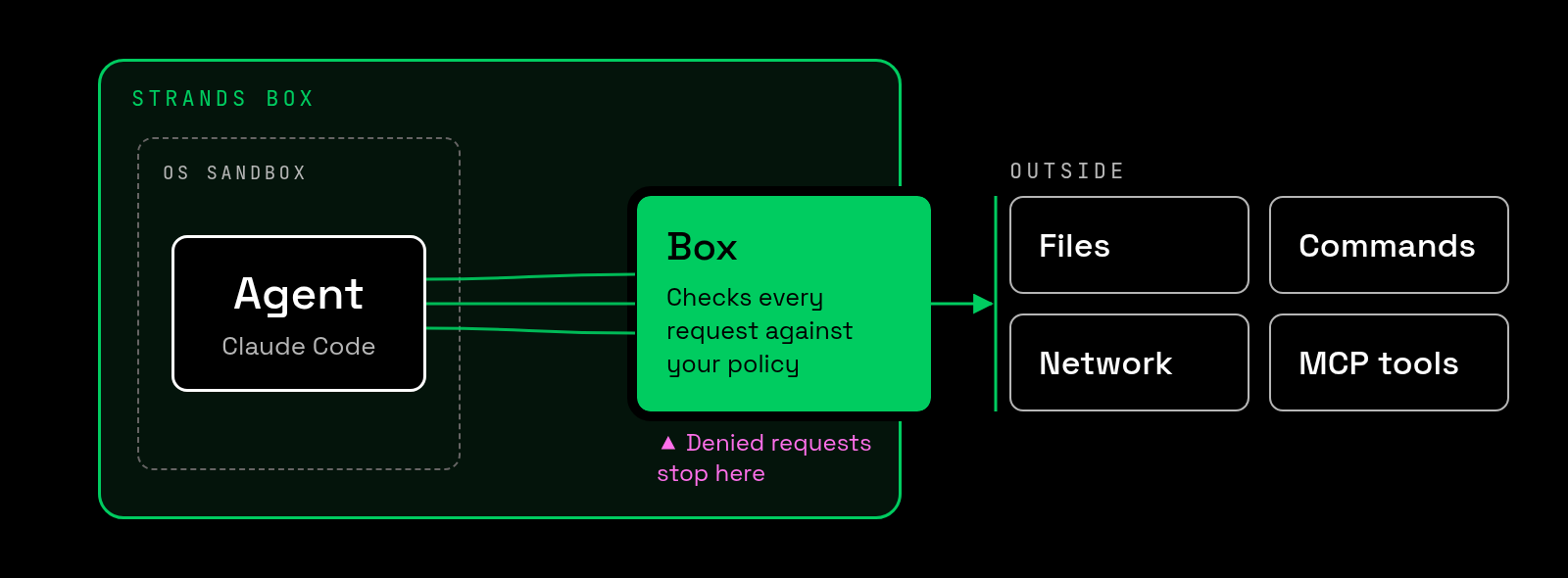
The picture is simplified: the agent’s own file reads and writes reach only the files the profile
grants, and the sandbox enforces that. Box checks the rest against policy, including each command
the box’s shell runs itself, such as echo, cp, or a redirect. A program that the shell starts,
such as git or node, runs in a sandbox of its own, which reaches only the files its toolchain
grants. So a file rule in your policy decides the shell’s own commands, and not what those
programs or the agent’s file tools open
(Where file rules apply).
A sandbox refusal fails with an error such as operation not permitted.
It isn’t a policy decision, so the activity banner and the run history don’t show it.
The policy check runs outside the model, so nothing the agent reads or decides can change the answer, and the agent can’t change its own policy. When a rule denies something, Box gives the agent the rule’s reason, so it can stop or ask you instead of retrying.
While the agent runs, the activity banner below it shows what the box
allows and denies. Afterward, box runs history lists every decision.
Profiles
Section titled “Profiles”A profile decides how the box is set up for one agent: the agent, its model provider, its
toolchains, what it can reach, and its policy. It names packs for the details and holds only your
choices, and box sets up the box from it at the start of every run. The agent’s storage, where it keeps its
settings, sessions, and memory between runs, belongs to the profile, so two profiles never see each
other’s.
packs = ["@box/claude", "@box/bedrock", "@box/git", "@box/npm"]policies = ["policy.dw"]Profiles explains where profiles live and how to change one.
A pack holds what one program needs in a box: how to start it, where its settings are, and which
hosts it reaches. A profile lists its packs, and box puts them together for each run.
An agent pack runs the agent, a tool pack runs a program that the agent calls from its shell, and a support pack adds the rest, such as a model provider’s route and where Box gets its credential. Packs says what each kind holds and how to write one, and the user guide lists the packs that Box ships.
Starters
Section titled “Starters”A starter is the set of questions box profile create asks to make a profile, such as which model
provider to use and which region. Box ships one for each agent it supports, and a starter can read
answers from the agent’s own settings so you answer less. You can write your own to give a team one standard setup
(Starters).
Policy
Section titled “Policy”A policy is the set of rules the box checks. Each rule is about something the agent does: running a command, a file that a command reads or changes, a request to a host, or a call to an MCP tool. A rule can also look back at what the agent already did, such as allowing at most 60 calls to a server in an hour.
Every profile starts from a policy that is picked when the profile is made
(Pick the agent’s policy). The rules are copied into the
profile’s policy.dw, which is yours to edit, and you can add your own files beside it. Your packs
and profile settings add rules too, such as one for each host a route names
(Policies). Rules are
written in Dogwood. You don’t have to write them by
hand: box help agent gives a coding agent outside the box a guide that it
follows to write them for you.
An edit to a rule can take effect while the agent keeps running: the banner shows that an update is ready, and one keypress applies it.
Credentials
Section titled “Credentials”The agent needs keys to do its work, such as its model key or a token to push to GitHub. Box keeps
them outside the box. A host that needs a key is reached through a route: an [egress.<name>]
table in a pack or the profile that names the hosts and where the key comes from, such as a
variable in your shell, never the key itself. Where the key comes from can also be your password manager: a plugin in the profile reads it on your machine when the box starts (Read a token from your vault). Inside the box, the agent sees a placeholder key in place
of the key, and Box puts the real key in as the request leaves for one of the route’s hosts.
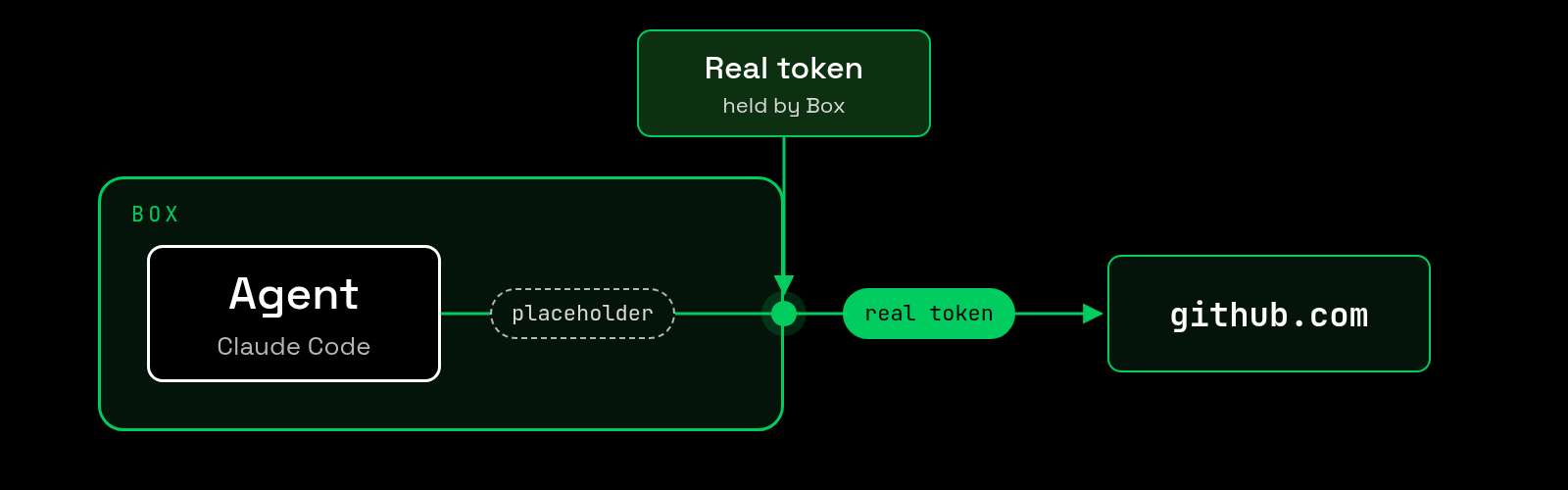
The model provider’s pack sets this up for the model key. For another service, you add a route to the profile (Give the agent a token for another service).
Runs and box IDs
Section titled “Runs and box IDs”Each box run gets a box of its own, with a box ID such as b-5b8e3d70c92f14ab. The box
keeps a record of what it allowed and denied, which box runs history
reads. To let rules that count over time keep counting, run in the same box again with
--box-id (Run in the same box again).
What a box doesn’t do
Section titled “What a box doesn’t do”A box limits what the agent can reach, but it doesn’t check what the agent writes into your project, and anything you let it reach, it can use. Limitations says what to check before you trust a run.
Where to go next
Section titled “Where to go next”- Get started: install
boxand run Claude Code in a box. - Command reference: every
boxcommand and its flags. - For how each part works inside, the design pages go deeper.