Agent-Generated Workout Tracker UI
View the complete sample on GitHub
Related documentation: Custom tools, Streaming, Session management
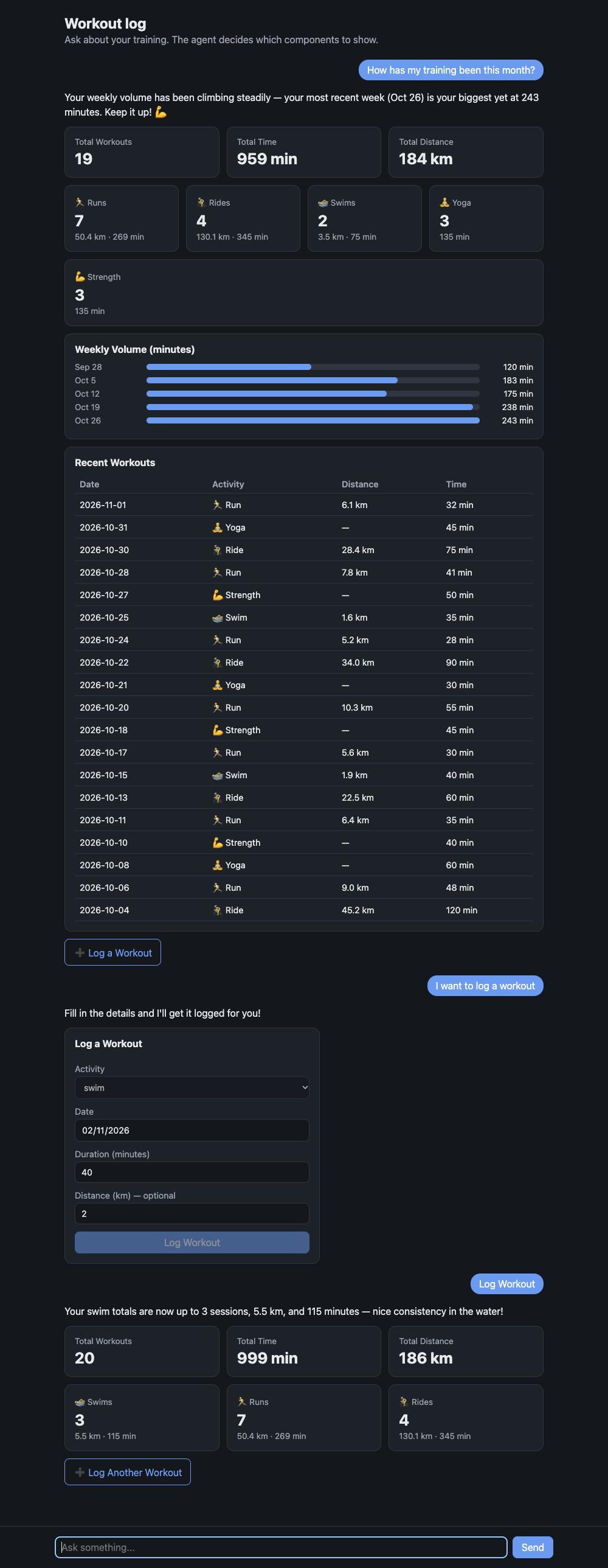
An agent that answers with UI, not just text. You ask a question, the agent picks components from a catalog the app defines (stats, charts, tables, forms, buttons), and the browser renders them. When someone submits a form or clicks a button, the interaction goes back to the agent, which acts on it and renders again.
The sample is a small workout log, but the pattern carries over to any app: define your components as a schema, give the agent a tool that takes that schema, and render what it sends.
Overview
Sample Details
| Information | Details |
|---|---|
| Agent Architecture | Single-agent |
| Native Tools | None |
| Custom Tools | render_ui, list_workouts, summarize_workouts, log_workout |
| MCP Servers | None |
| Use Case Vertical | Generative UI |
| Complexity | Basic |
| Model Provider | Amazon Bedrock |
| SDK Used | Strands Agents SDK, FastAPI |
Architecture
sequenceDiagram participant B as Browser (web/app.js) participant S as FastAPI (server.py) participant A as Strands agent (agent.py) B->>S: POST /api/chat { chat, message } S->>A: agent(message) A->>A: list_workouts / summarize_workouts A->>A: render_ui(components) - validated against catalog.py A-->>S: reply text + rendered components S-->>B: { text, ui } B->>B: one renderer per component type B->>S: form submit / button click as "[ui action] ..." messageKey Features
- The schema is the contract.
catalog.pydefines every component as a Pydantic model. Those models are therender_uitool’s input, so the model can only produce components your app supports, and Strands validates them before your code sees them. - The agent chooses the layout. Different questions get different UI: totals become stat cards, trends become a bar chart, lists become a table, and “I want to log a workout” becomes a form.
- Interactive round trip. Forms and buttons carry an
actionname. Interactions come back to the agent as a chat message, so it can log the workout and render an updated view. - No frontend build. The client is plain HTML and JavaScript. It renders with DOM APIs and text nodes only, so model output can’t inject markup.
Prerequisites
- Python 3.10+
- AWS credentials configured, with model access to the Strands default model on Amazon Bedrock (Claude Sonnet)
Setup
python -m venv .venvsource .venv/bin/activatepip install -r requirements.txtUsage
python server.pyOpen http://127.0.0.1:8000. The server only listens on 127.0.0.1 and has no authentication, so it’s for local use. Set PORT to change the port.
Example Queries
- “How has my training been this month?” (stats, a weekly bar chart and a table)
- “Show my runs from the last two weeks” (a table)
- “I want to log a workout” (a form; submit it and the agent logs the workout and shows the updated totals)
How It Works
1. Define the catalog (catalog.py). Each component is a Pydantic model with a type literal, combined into a discriminated union. Field descriptions are written for the model, because they end up in the tool schema.
class Stat(BaseModel):    type: Literal["stat"]    label: str    value: str = Field(description="The headline number, formatted for display, e.g. '42 km'.")

Component = Annotated[Text | Stat | Table | BarChart | Form | Button | Row, Field(discriminator="type")]
2. Give the agent a render_ui tool (agent.py). The tool’s only job is to collect validated components for the current turn.
@tooldef render_ui(self, components: list[Component]) -> str: """Show UI components to the user, in order, below your reply.""" self.ui.extend(components) return "Shown to the user. Now write your short reply."3. Return the components with the reply. Chat.send() runs the agent and returns {"text": ..., "ui": [...]}.
4. Render by type (web/app.js). A lookup table maps each type to a function that builds DOM. Unknown types are skipped.
5. Send interactions back. A form submit becomes a message like [ui action] log_workout {"activity": "swim", "minutes": "40"}, and the system prompt tells the agent how to handle it.
Using This in Your Own App
- Replace
catalog.pywith the components your design system already has, and keep the props small and display-ready (formatted strings rather than raw values the client has to format). - Write the renderer in your own frontend framework. A React version is the same lookup table with a component per
type. - Do calculations in tools rather than letting the model do arithmetic. Here,
summarize_workoutscomputes every total and the prompt tells the agent to use it. - To render while the model is still writing, switch from
agent(...)toagent.stream_async(...)and forward the tool input as it streams. - Each chat keeps its agent in server memory and the workout log isn’t persisted, which keeps the sample short. A real app would add a session manager and a database.
Project Structure
| File | Purpose |
|---|---|
catalog.py | Component catalog (Pydantic models) |
agent.py | System prompt, render_ui tool, and Chat wrapper |
tools.py | Workout data tools |
server.py | FastAPI app: POST /api/chat and static files |
web/ | Browser client and renderer |
data/workouts.json | Sample workouts, with dates relative to today |
A TypeScript version of this sample lives in typescript/03-ux-demos/dynamic-ui and uses the same web client.
Additional Resources
- Custom tools: defining tools like
render_uiwith typed input schemas - Streaming: rendering components while the model is still writing
- Session management: persisting conversations across restarts
- AG-UI and CopilotKit sample: tool-based generative UI with a protocol and frontend framework
Disclaimer
This sample is provided for educational and demonstration purposes only. It is not intended for production use without further development, testing, and hardening.