Human-in-the-Loop Order Approval
View the complete sample on GitHub
Related documentation: Interrupts, Multi-agent graphs
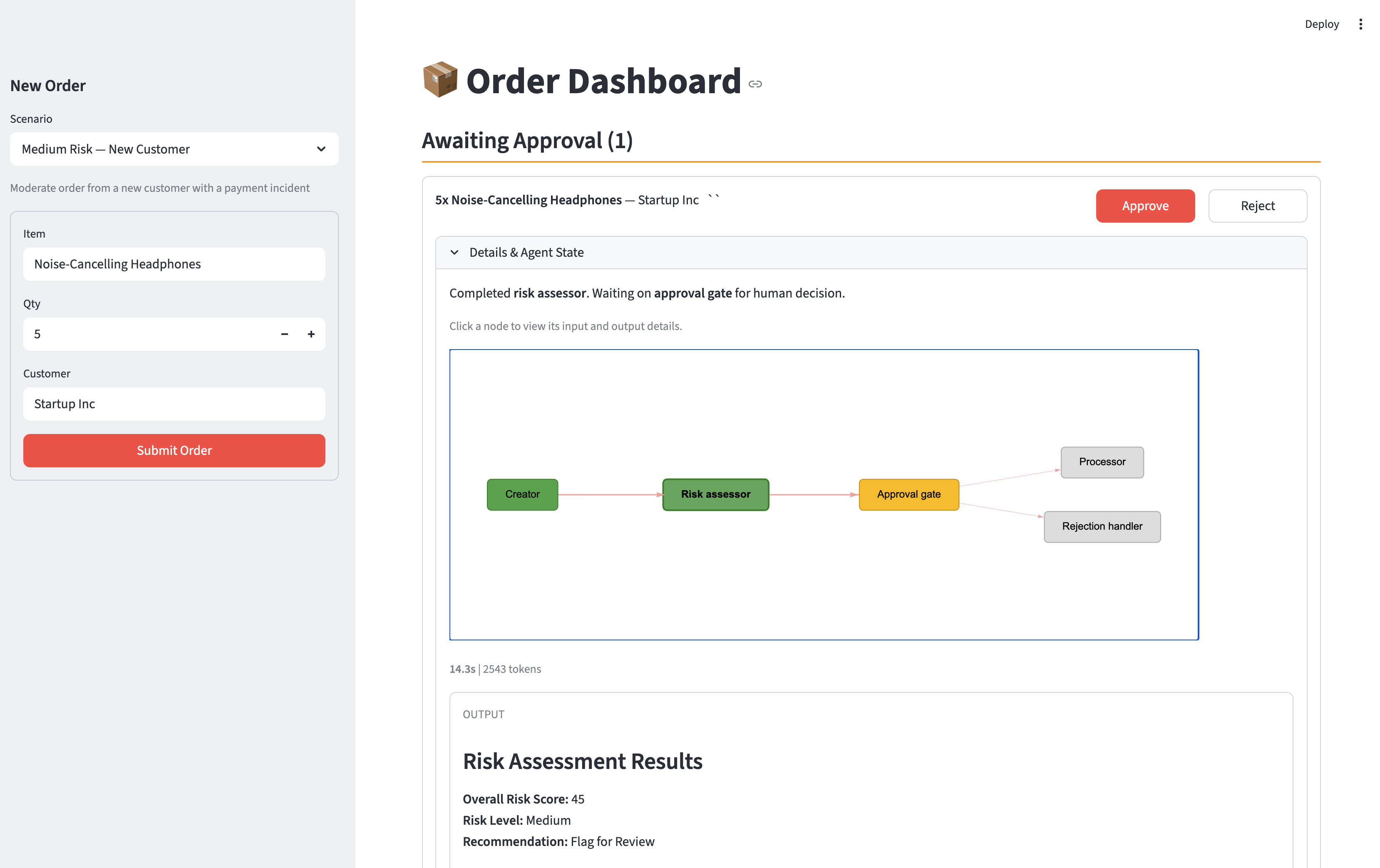
An order approval system that demonstrates human-in-the-loop workflows using Strands Agents’ interrupt/resume pattern. A multi-agent graph evaluates incoming orders — assessing risk factors like customer history, order value, and inventory levels — then pauses execution to let a human approver make the final call. The Streamlit UI provides an interactive dashboard where approvers can review AI-generated risk assessments, inspect each agent’s reasoning by clicking through the workflow graph, and approve or reject orders in real time.
Overview
Sample Details
| Information | Details |
|---|---|
| Agent Architecture | Multi-agent (Graph) |
| Use Case Vertical | Retail / E-Commerce |
| Complexity | Advanced |
| Model Provider | Amazon Bedrock |
| SDK Used | Strands Agents SDK, AWS CDK |
Architecture
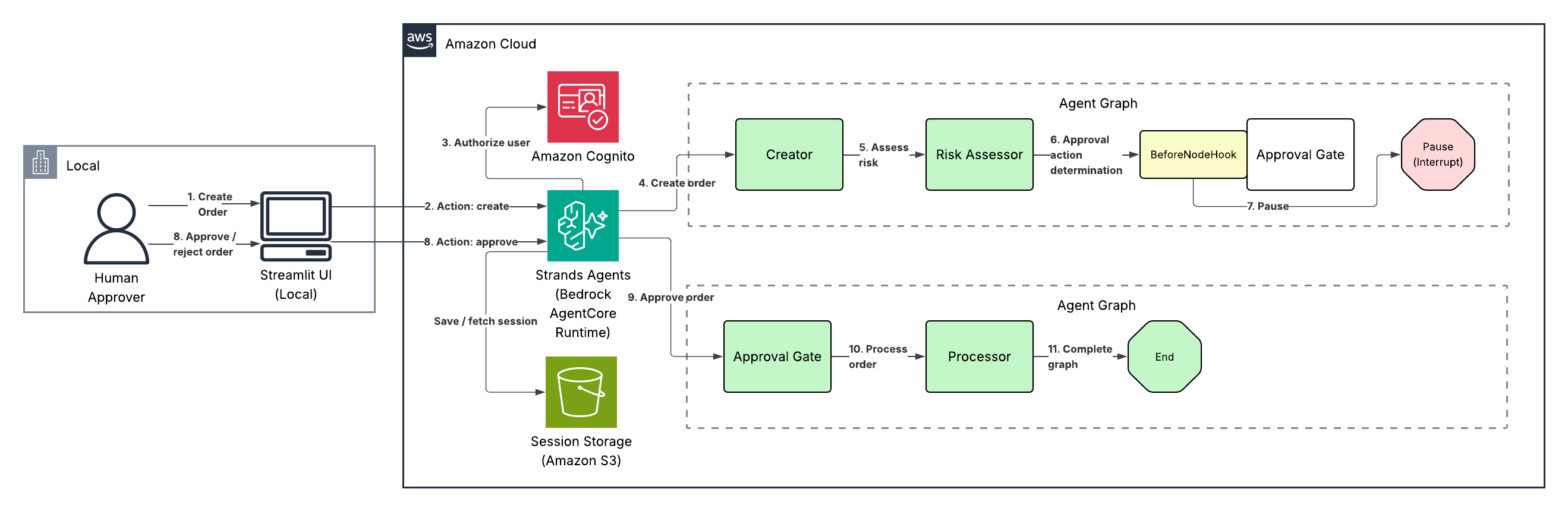
The system uses a five-node agent graph deployed to AgentCore Runtime, with a Streamlit UI running locally as the human approval interface.
Agent Graph Flow:
- Creator — Looks up products in the catalog, validates inventory, and structures the order with line items, pricing, and totals.
- Risk Assessor — Scores the order across five risk factors (order value, customer newness, customer tier, payment history, inventory strain) producing a 0-100 risk score.
- Approval Gate — A
BeforeNodeHookchecks the risk score. Orders scoring 30 or below are auto-approved. Higher-risk orders trigger a Strandsinterrupt, pausing the graph and returning control to the UI for human review. - Processor (on approval) — Places the order, decrements inventory, and generates a confirmation with estimated delivery.
- Rejection Handler (on rejection) — Acknowledges the rejection and suggests next steps for the customer.
Session state is persisted in S3 via S3SessionManager, enabling the interrupt/resume cycle across stateless HTTP calls.
Demo Scenarios
The UI includes pre-configured scenarios that exercise different branches of the approval logic:
| Scenario | Item | Customer | What It Demonstrates |
|---|---|---|---|
| Low Risk — Trusted Customer | 2x Wireless Keyboard | Acme Corp (Gold tier) | Auto-approval path — low value order from an established customer bypasses human review entirely |
| Medium Risk — New Customer | 5x Noise-Cancelling Headphones | Startup Inc (Standard tier) | Human review triggered — new customer with a payment incident pushes the risk score above the auto-approve threshold |
| High Risk — Unknown Customer | 4x Motorized Standing Desk | Unknown LLC (not in DB) | High risk score from unknown customer + high order value + inventory strain on a limited-stock item |
| Inventory Strain — Bulk Order | 10x Standing Desk Chair | MegaCorp LLC (Platinum tier) | Even a trusted platinum customer triggers review when ordering most of the available stock |
| Custom Order | (user-defined) | (user-defined) | Free-form entry to test any combination of products, quantities, and customers |
Key Features
- Strands Agents interrupt/resume pattern for human-in-the-loop workflows
- Multi-agent graph with conditional branching (approve vs. reject paths)
- Risk scoring engine with five weighted factors and configurable auto-approve threshold
- Interactive workflow graph (streamlit-agraph) — click any node to inspect its output
- Deployed to Amazon Bedrock AgentCore Runtime via CDK with IAM authentication
- S3-backed session persistence across stateless invocations
Prerequisites
- Python 3.13+
- uv for dependency management
- AWS CDK v2 (
npm install -g aws-cdk) - AWS CLI configured with credentials that have permissions to deploy CDK stacks
- Amazon Bedrock model access enabled for
us.amazon.nova-pro-v1:0(or your preferred model) in your region - Docker (for building the AgentCore Runtime container image)
Setup
1. Deploy Infrastructure
cd infrastructure./deploy.shThis deploys the CDK stack and writes outputs to cdk-outputs.json. The stack creates:
- AgentCore Runtime (builds and pushes the Docker image from
src/) - S3 bucket for session state
2. Configure the Streamlit Environment
cd streamlit_app./configure_env.shuv syncThis generates a populated streamlit_app/.env from cdk-outputs.json automatically — no manual copy-pasting required.
Usage
uv run streamlit run app.pyOpen http://localhost:8501 in your browser.
Flow Overview
- Select a scenario (or create a custom order) in the sidebar and click Submit Order.
- The agent graph runs — the Creator structures the order, the Risk Assessor scores it.
- If the risk score exceeds the threshold, the graph pauses and the order appears under Pending Approvals.
- Click nodes in the workflow graph to inspect each agent’s reasoning and output.
- Click Approve or Reject to resume the graph.
- The Processor or Rejection Handler completes the workflow and the order moves to Completed.
- Low-risk orders skip the approval step entirely and appear directly under Completed as auto-approved.
Local Development (No AgentCore)
To test the agent locally without deploying to AgentCore Runtime:
cd src./configure_env.sh # generates .env from cdk-outputs.jsonuv syncuv run python -m main # starts local server on :8080Then in streamlit_app/.env, uncomment the local dev lines:
LOCAL_MODE=trueLOCAL_AGENT_URL=http://localhost:8080/invocationsProject Structure
| Component | Path | Description |
|---|---|---|
| Agent graph | src/main.py | Multi-agent graph with interrupt hook, deployed to AgentCore Runtime |
| Agent tools | src/tools.py | Product lookup, risk assessment, and order placement tools |
| Product/customer data | src/data.py | In-memory product catalog and customer database |
| Container | src/Dockerfile | ARM64 image for AgentCore Runtime |
| Agent env config | src/configure_env.sh | Generate src/.env for local development from cdk-outputs.json |
| Streamlit UI | streamlit_app/app.py | Local UI for order creation, approval, and agent state inspection |
| CDK stack | infrastructure/stack.py | AgentCore Runtime, S3 |
| Deploy script | infrastructure/deploy.sh | One-command CDK deploy |
| Env config script | streamlit_app/configure_env.sh | Generate streamlit_app/.env from cdk-outputs.json |
| Cleanup script | infrastructure/cleanup.sh | Tear down all resources |
Cleanup
cd infrastructure./cleanup.shThis destroys the CDK stack including the AgentCore Runtime and S3 bucket (and all session data).
Troubleshooting
| Symptom | Likely Cause | Fix |
|---|---|---|
| Order stuck in pending | Agent invocation error | Check AgentCore Runtime logs in CloudWatch |
401 Unauthorized from AgentCore | Missing or expired AWS credentials | Check your AWS CLI credentials (aws sts get-caller-identity) |
| Docker build fails | Docker not running | Start Docker Desktop |
Additional Resources
- Strands Agents SDK
- Strands Agents — Multi-Agent Graphs
- Strands Agents — Interrupts
- Amazon Bedrock AgentCore Runtime
- AWS CDK v2 Python
Disclaimer
This sample is provided for educational and demonstration purposes only. It is not intended for production use without further development, testing, and hardening.
For production deployments, consider:
- Implementing appropriate content filtering and safety measures
- Following security best practices for your deployment environment
- Conducting thorough testing and validation
- Reviewing and adjusting configurations for your specific requirements