AWS Lambda Failure Analysis Agent
View the complete sample on GitHub
Related documentation: Strands Agents SDK
AI-powered Lambda error diagnostics that transforms generic error messages into intelligent root cause analysis with actionable fix recommendations and confidence scoring.
Overview
Sample Details
| Information | Details |
|---|---|
| Agent Architecture | Single-agent with multi-tool orchestration |
| Native Tools | None |
| Custom Tools | fetch_source_code, fetch_cloudwatch_logs, search_knowledge_base |
| MCP Servers | None |
| Use Case Vertical | DevOps / Software Development |
| Complexity | Advanced |
| Model Provider | Amazon Bedrock (Claude Sonnet 4.6) |
| SDK Used | Strands Agents SDK, AWS CDK, boto3 |
Architecture
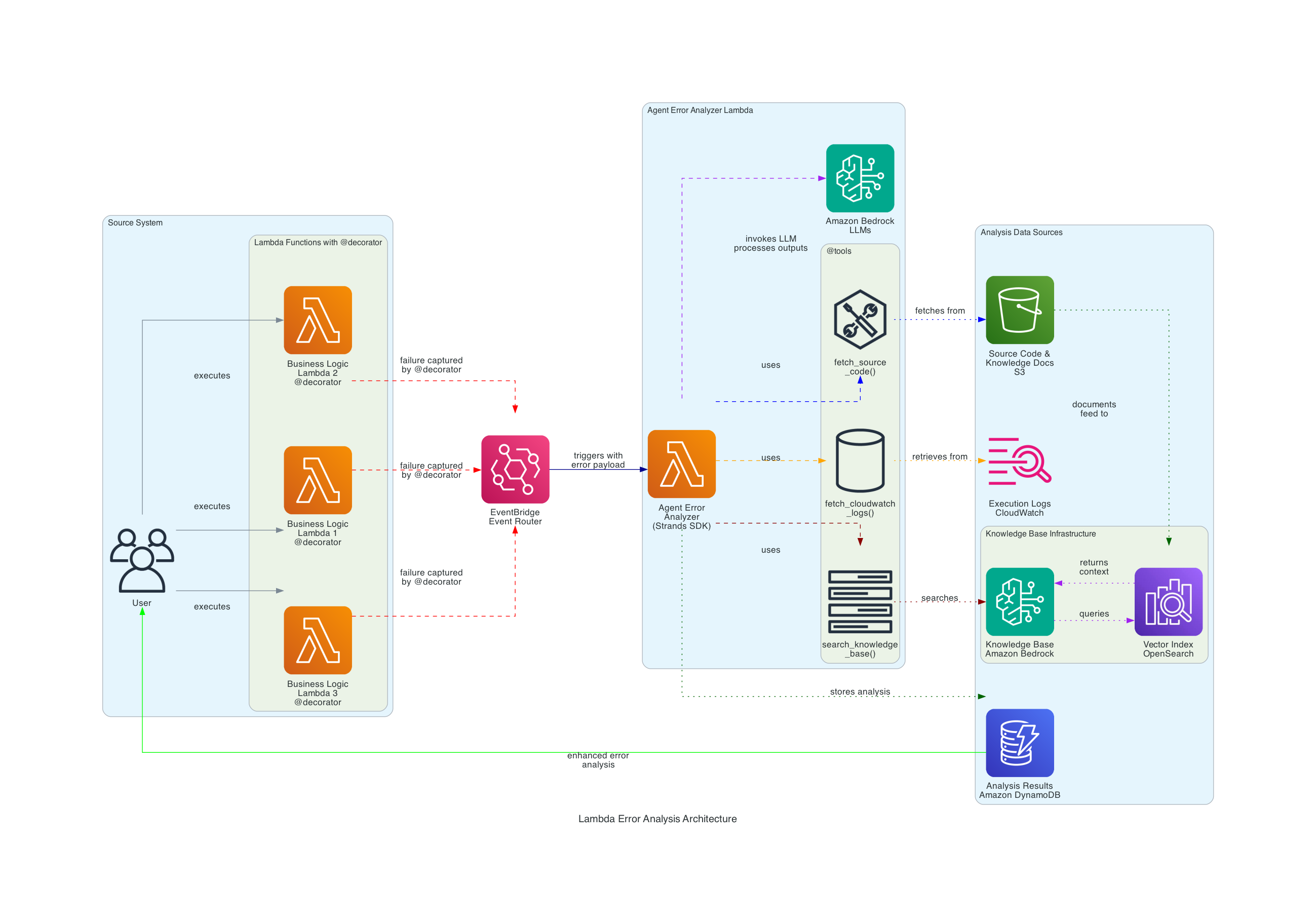
Event-driven error analysis system that automatically investigates Lambda failures using AI:
- Lambda function fails →
@error_capturedecorator publishes event to EventBridge - EventBridge triggers Error Analyzer Agent
- Agent uses 3 tools to gather context:
fetch_source_code- Retrieves Lambda source from S3/deployment packagefetch_cloudwatch_logs- Gets execution logs filtered by request IDsearch_knowledge_base- Queries Bedrock Knowledge Base for error patterns
- Claude Sonnet 4.6 analyzes with interleaved thinking and generates:
- Root cause identification
- Specific fix recommendations
- Confidence score (0.0-1.0) based on evidence quality
- Results stored in DynamoDB for historical analysis
Key Features
- Automated Error Investigation - No manual log diving, agent gathers all context automatically
- Multi-Source Analysis - Combines source code, execution logs, and documentation for comprehensive insights
- Interleaved Thinking - Claude Sonnet 4.6 reasons between tool calls for smarter investigation
- Confidence Scoring - Evidence-based scoring (0.0-1.0) indicates analysis reliability
- Historical Tracking - All analyses stored in DynamoDB for pattern recognition
- Reusable Decorator - Simple
@error_capturewrapper for any Lambda function - 9 Test Scenarios - Comprehensive test cases covering common validation errors
Prerequisites
- AWS Account with appropriate permissions
- AWS CLI configured with credentials (
aws configure) - Node.js 18+ and npm
- Python 3.12+
- Docker installed and running (for building Lambda layers)
- Amazon Bedrock model access enabled for:
- Claude Sonnet 3.7 (
us.anthropic.claude-sonnet-4-6) - Claude Sonnet 4.6 (
us.anthropic.claude-sonnet-4-6)
- Claude Sonnet 3.7 (
Setup
-
Install dependencies:
Terminal window npm install -
Bootstrap CDK (if not done already):
Terminal window npx cdk bootstrap -
Build and deploy infrastructure:
Terminal window npm run deployThis will:
- Build TypeScript CDK code
- Build Strands Lambda layer using Docker
- Deploy all AWS resources (Lambda, EventBridge, DynamoDB, S3, Bedrock Knowledge Base)
-
Sync Knowledge Base (after deployment):
Open the Jupyter notebook to sync the Knowledge Base with documentation:
Terminal window jupyter notebook deploy-agent.ipynbRun the “Sync Knowledge Base” section to ingest error patterns and best practices.
Usage
Interactive deployment and testing (recommended):
jupyter notebook deploy-agent.ipynbThe notebook provides:
- Step-by-step deployment walkthrough
- 3 pre-configured test scenarios
- Real-time log monitoring
- Analysis results visualization
- DynamoDB query examples
Test scenarios included:
- Missing email field (KeyError)
- Null email value (AttributeError)
- Zero age division (ZeroDivisionError)
Direct CDK deployment:
# Deploynpm run cdk deploy
# View stack outputsaws cloudformation describe-stacks --stack-name LambdaErrorAnalysisStack
# Invoke business function with test payloadaws lambda invoke \  --function-name <business-function-name> \  --payload '{"user_data":{"profile":{"name":"Test"},"age":25}}' \  response.json
Cleanup
When you’re done testing, destroy all AWS resources:
npx cdk destroy --forceOr use the cleanup section in the Jupyter notebook.
Project Structure
| Component | File(s) | Description |
|---|---|---|
| CDK Infrastructure | cdk-app.ts, cdk.json, package.json | CDK application entry point and configuration |
| CDK Stack | cdk/stacks/lambda-error-analysis-agent-stack.ts | Main infrastructure stack definition |
| Business Function | cdk/lambda/sample-business-function/ | Demo Lambda with intentional bugs and @error_capture decorator |
| Error Analyzer | cdk/lambda/error-analyzer-agent/ | AI agent with 3 custom tools for error analysis |
| Lambda Layer | cdk/layers/strands-layer/ | Strands SDK dependencies layer with build script |
| Knowledge Base | knowledge_base/*.md | Error patterns, best practices, troubleshooting guides |
| Diagrams | images/ | Architecture diagrams with generation script |
| Deployment Notebook | deploy-agent.ipynb | Interactive deployment and testing walkthrough |
How It Works
Sample Business Function
Simulates a digital banking user registration service with 8 intentional bugs:
- Missing required fields (email, profile)
- Null value handling
- Type conversion errors
- Division by zero edge cases
- Nested data access failures
Error Analyzer Agent
Strands Agent with Claude Sonnet 4.6 featuring interleaved thinking:
- Reasons between tool calls for smarter investigation
- Uses 3 custom tools:
fetch_source_code,fetch_cloudwatch_logs,search_knowledge_base - Calculates confidence score (0.0-1.0) based on evidence quality
- Stores results in DynamoDB for historical tracking
Confidence Scoring
Score = Knowledge Base (0.0-0.4) + Source Code (0.0-0.3) + Logs (0.0-0.3)
0.8+   : Very High confidence0.6-0.8: High confidence0.4-0.6: Medium confidence0.2-0.4: Low confidence<0.2   : Very Low confidence
Example Analysis
Input Error:
KeyError: 'email'Payload: {"profile": {"name": "Jane"}, "age": 25}AI Analysis (8 seconds):
🤖 Root Cause: Missing 'email' field in user_data dictionary
💡 Fix: Add input validation before processing:   required_fields = ['email', 'profile', 'age']   missing = [f for f in required_fields if f not in user_data]   if missing:       raise ValueError(f"Missing: {missing}")
📊 Confidence: 0.85 (High)📈 Evidence: Source code + logs + 3 KB docs
Troubleshooting
| Symptom | Likely Cause | Fix |
|---|---|---|
| Docker build fails | Docker not running | Start Docker Desktop and retry |
| CDK bootstrap error | Not bootstrapped in region | Run npx cdk bootstrap |
| Bedrock access denied | Models not enabled | Enable Claude models in Bedrock console |
| Knowledge Base sync fails | Ingestion job timeout | Check S3 bucket permissions and retry |
| Agent not analyzing | EventBridge rule disabled | Check rule status: aws events list-rules --name-prefix LambdaErrorAnalysis |
| Low confidence scores | Missing evidence | Ensure source code uploaded to S3 and Knowledge Base synced |
Additional Resources
- Strands Agents SDK Documentation
- AWS CDK Developer Guide
- Amazon Bedrock User Guide
- Claude Sonnet 4.6 with Interleaved Thinking
- AWS Lambda Best Practices
Disclaimer
This sample is provided for educational and demonstration purposes only. It is not intended for production use without further development, testing, and hardening.
For production deployments, consider:
- Implementing appropriate content filtering and safety measures
- Following security best practices for your deployment environment
- Conducting thorough testing and validation
- Reviewing and adjusting configurations for your specific requirements
- Setting up proper monitoring and alerting
- Implementing cost controls and budgets
- Reviewing and securing IAM permissions
- Encrypting sensitive data at rest and in transit