AgentCore
View the complete sample on GitHub
This tutorial demonstrates how to deploy a Strands Agent to Amazon Bedrock AgentCore Runtime for production workloads.
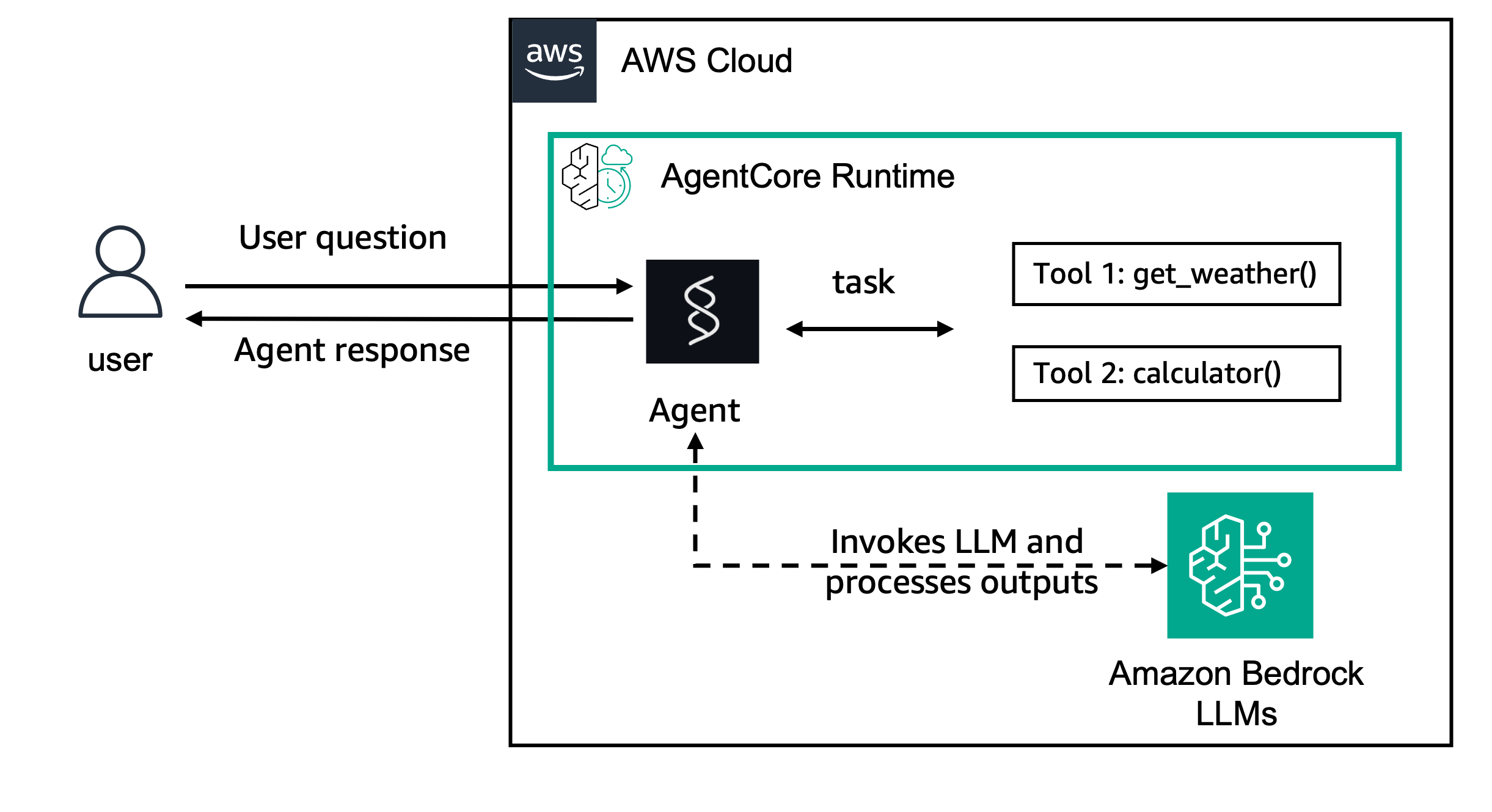
| Feature | Description |
|---|---|
| Deployment target | Amazon Bedrock AgentCore Runtime |
| Agent type | Single agent with Express server |
| Model | Claude Haiku 4.5 via Amazon Bedrock |
Prerequisites
- Node.js 20.x or later
- AWS CLI configured with appropriate permissions
- AWS account with AgentCore access
- Docker with buildx support, or AWS CodeBuild permissions
Running Locally
cd typescript/02-deploy/01-agentcorenpm installnpm run devTest the agent:
curl http://localhost:8080/pingcurl -X POST http://localhost:8080/invocations \ -H "Content-Type: application/json" \ -d '{"input": {"prompt": "What is the weather?"}}'Deploying to AgentCore
Setup Prerequisites
Run the setup script to create the IAM role and ECR repository:
chmod +x setup-prerequisites.sh./setup-prerequisites.shExport the variables printed by the script:
export ROLE_ARN=<role-arn-from-script>export REPO_URI=<repo-uri-from-script>export AWS_REGION=us-east-1Build and Push Docker Image
chmod +x build-image.sh./build-image.shNote: The script auto-detects your environment and uses local Docker or AWS CodeBuild accordingly.
Create AgentCore Runtime
npm run deployInvoke Deployed Agent
AGENT_RUNTIME_ARN=<arn-from-deploy> npm run invoke "What is the weather?"Key Concepts
AgentCore Runtime Service Contract
AgentCore Runtime requires a containerized application exposing two HTTP endpoints: /ping for status tracking and /invocations for processing requests:
app.get('/ping', (_req, res) => {  res.json({ status: 'Healthy' });});
app.post('/invocations', async (req, res) => {  const prompt = req.body.input?.prompt;  const result = await agent.invoke(prompt);  res.type('text/plain').send(result.toString());});
Creating an AgentCore Runtime
Use the AWS SDK to create an AgentCore Runtime that references your container image:
const command = new CreateAgentRuntimeCommand({ agentRuntimeName: AGENT_NAME, agentRuntimeArtifact: { containerConfiguration: { containerUri: `${repositoryUri}:latest` } }, networkConfiguration: { networkMode: 'PUBLIC' }, roleArn});Invoking the AgentCore Runtime
Send requests to the deployed agent using the InvokeAgentRuntime API:
const command = new InvokeAgentRuntimeCommand({ agentRuntimeArn: AGENT_RUNTIME_ARN, runtimeSessionId: sessionId, payload: new TextEncoder().encode(prompt), qualifier: 'DEFAULT'});Project Structure
├── Dockerfile # Container image for AgentCore├── setup-prerequisites.sh # Setup script (IAM role, ECR repo)├── build-image.sh # Build script (Docker or CodeBuild)├── package.json├── tsconfig.json└── src/ ├── agent.ts # Express server with Strands Agent ├── deploy-agent.ts # AgentCore deployment script └── invoke-agent.ts # Remote invocation scriptCleanup
# Delete AgentCore Runtimeaws bedrock-agentcore-control delete-agent-runtime \  --agent-runtime-id <runtime-id> --region us-east-1
# Delete ECR repositoryaws ecr delete-repository \  --repository-name agentcore-deployment \  --region us-east-1 --force
# Delete IAM roleaws iam delete-role-policy --role-name AgentCoreRuntimeRole --policy-name AgentCoreRuntimePolicyaws iam delete-role --role-name AgentCoreRuntimeRole
# (Optional) Delete CodeBuild resources if createdaws codebuild delete-project --name agentcore-image-builderaws iam delete-role-policy --role-name CodeBuildAgentCoreRole --policy-name CodeBuildPolicyaws iam delete-role --role-name CodeBuildAgentCoreRole