Next.js Vercel Adapter
View the complete sample on GitHub
A create-next-app-shaped chat sample where the Vercel AI SDK owns the client and the providers, and Strands Agents runs the loop, tools, sessions, and hooks inside the Next.js route handler through the VercelModel adapter. One-click deploy to Vercel, plus a container path to Amazon Bedrock AgentCore.
Overview
Sample Details
| Information | Details |
|---|---|
| Agent Architecture | Single-agent |
| Native Tools | calculator, current_time |
| Custom Tools | None (Zod-typed tools defined inline in lib/tools.ts) |
| MCP Servers | None |
| Use Case Vertical | Developer tooling / Conversational AI |
| Complexity | Intermediate |
| Model Provider | Amazon Bedrock (default) or OpenAI |
| SDK Used | Strands Agents SDK (TypeScript) + Vercel AI SDK |
Architecture
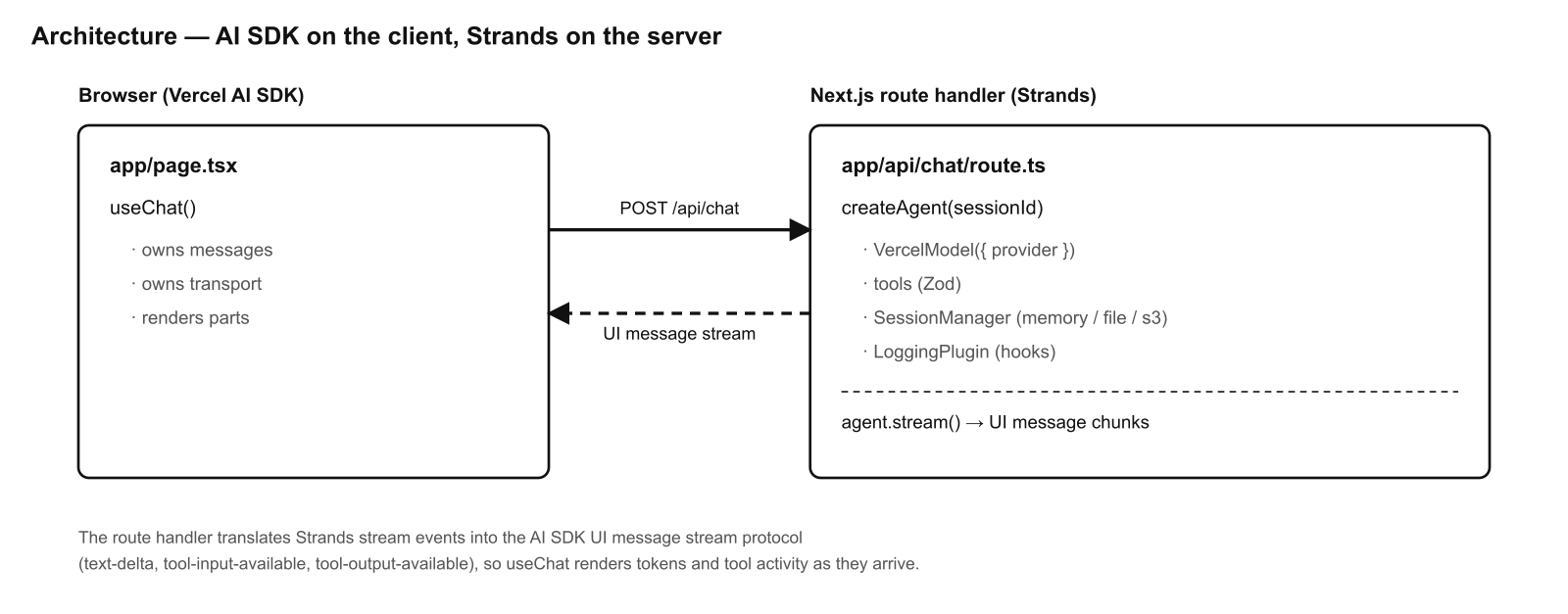
The route handler translates Strands stream events into the AI SDK UI message
stream protocol (text-delta, tool-input-available, tool-output-available),
so useChat renders tokens and tool activity as they arrive.
Key Features
- AI SDK on the client —
useChatfrom@ai-sdk/reactmanages the conversation and streaming UI. - Strands on the server — the agent loop, Zod-typed tools, session persistence, and lifecycle hooks run in
app/api/chat/route.ts. VercelModeladapter — Strands wraps any Vercel AI SDK provider (@ai-sdk/amazon-bedrock,@ai-sdk/openai, …). Switch providers with one env var, no code changes.- One-click deploy to Vercel — ships as a serverless Node function.
- Container path to Amazon Bedrock AgentCore — the same agent, served over the AgentCore HTTP contract (
/ping+/invocations) on an ARM64 container.
Prerequisites
- Node.js 18+
- One model provider configured:
- Amazon Bedrock (default): AWS credentials and model access enabled for the configured model, or
- OpenAI: an
OPENAI_API_KEY.
- (Optional) Docker, for the AgentCore / Node host container paths.
Setup
-
Configure environment variables:
Terminal window cp .env.example .env.local# then fill in credentials (see Configuration below) -
Install dependencies:
Terminal window npm install
Usage
Run the dev server:
npm run devOpen http://localhost:3000. Try:
- “what is 128 divided by 4?” → calls the
calculatortool - “what time is it in America/Mexico_City?” → calls the
current_timetool
Configuration
All configuration is via environment variables — see .env.example.
Model provider (the AI SDK owns the provider; Strands wraps it)
| Variable | Default | Description |
|---|---|---|
MODEL_PROVIDER | bedrock | bedrock or openai. |
AWS_REGION | us-east-1 | Region for Amazon Bedrock. |
AWS_ACCESS_KEY_ID / AWS_SECRET_ACCESS_KEY | — | AWS credentials (Bedrock). |
BEDROCK_MODEL_ID | us.anthropic.claude-sonnet-4-20250514-v1:0 | Bedrock model id. |
OPENAI_API_KEY | — | Required when MODEL_PROVIDER=openai. |
OPENAI_MODEL_ID | gpt-4o-mini | OpenAI model id. |
To switch to OpenAI, set MODEL_PROVIDER=openai and OPENAI_API_KEY — no code changes.
Sessions (Strands persists conversation state)
| Variable | Default | Description |
|---|---|---|
SESSION_BACKEND | memory | memory, file, or s3. |
SESSION_DIR | ./.sessions | Directory for the file backend. |
SESSION_S3_BUCKET | — | Bucket for the s3 backend. |
SESSION_S3_PREFIX | sessions/ | Key prefix for the s3 backend. |
Deploy to Vercel
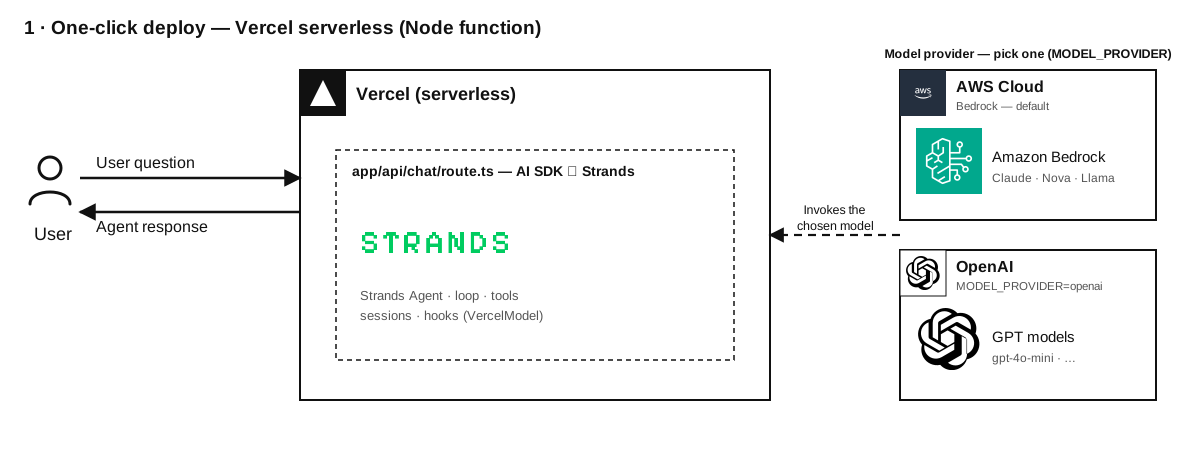
The /api/chat route runs on the Node.js runtime. Set your provider env vars in
the Vercel dashboard (see Configuration). For persistence across serverless
instances, use SESSION_BACKEND=s3.
Container path → Amazon Bedrock AgentCore
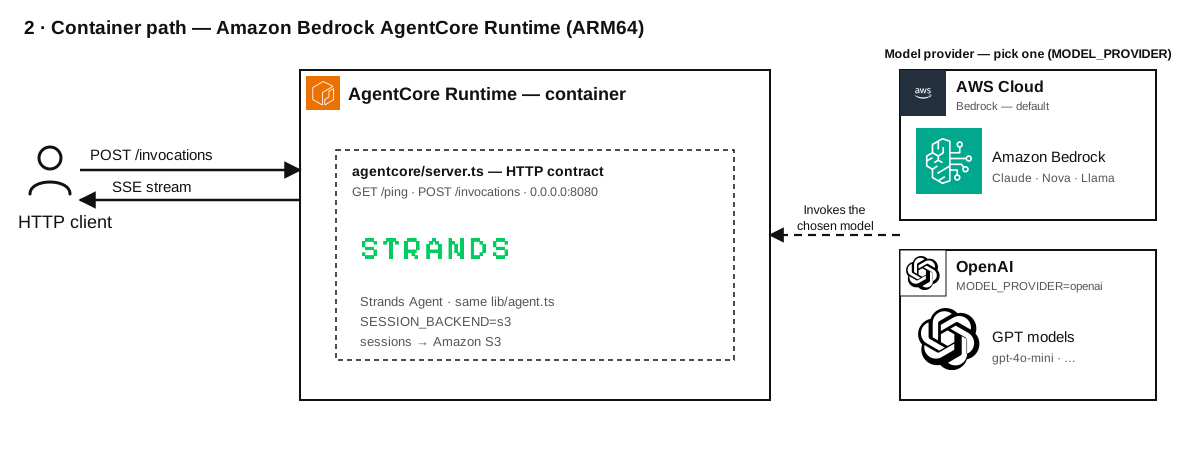
The same Strands agent (lib/agent.ts) is also served over the AgentCore HTTP
contract: GET /ping and POST /invocations (SSE streaming) on 0.0.0.0:8080,
ARM64.
# Run the AgentCore runtime locallynpm run agentcorecurl localhost:8080/pingcurl -N -X POST localhost:8080/invocations \  -H 'content-type: application/json' \  -d '{"prompt":"what is 21 * 2?","sessionId":"demo"}'
# Build the ARM64 image for AgentCoredocker build --platform linux/arm64 -f agentcore/Dockerfile -t strands-agentcore .
Push the image to Amazon ECR and create an AgentCore Runtime pointing at it. Use
SESSION_BACKEND=s3 so conversation state survives across instances. See the
AgentCore HTTP protocol contract.
Container path → any Node host
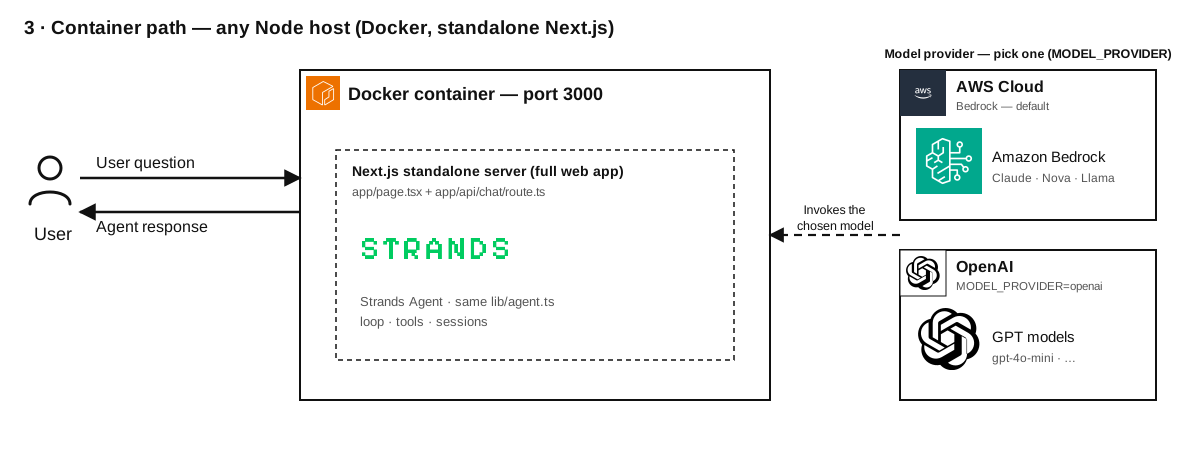
A production Dockerfile (standalone Next.js output) is included for running the
full web app anywhere:
docker build -t strands-nextjs .docker run -p 3000:3000 --env-file .env.local strands-nextjsProject Structure
| Component | File(s) | Description |
|---|---|---|
| Chat UI | app/page.tsx | Client chat UI (useChat). |
| API route | app/api/chat/route.ts | Strands loop bridged to the AI SDK UI stream. |
| Model | lib/model.ts | Provider selection → VercelModel. |
| Tools | lib/tools.ts | Zod-typed tools. |
| Hooks | lib/hooks.ts | LoggingPlugin — lifecycle hooks. |
| Sessions | lib/session.ts | Pluggable session storage. |
| Agent | lib/agent.ts | Assembles the Agent. |
| AgentCore | agentcore/ | Container path to Amazon Bedrock AgentCore. |
Additional Resources
Disclaimer
This sample is provided for educational and demonstration purposes only. It is not intended for production use without further development, testing, and hardening.
For production deployments, consider:
- Implementing appropriate content filtering and safety measures
- Following security best practices for your deployment environment
- Conducting thorough testing and validation
- Reviewing and adjusting configurations for your specific requirements