Model Providers
View the complete sample on GitHub
This sample demonstrates how to use different model providers (Bedrock and OpenAI) with the Strands Agents SDK, and how to configure model parameters like temperature and maxTokens.
What This Demo Does
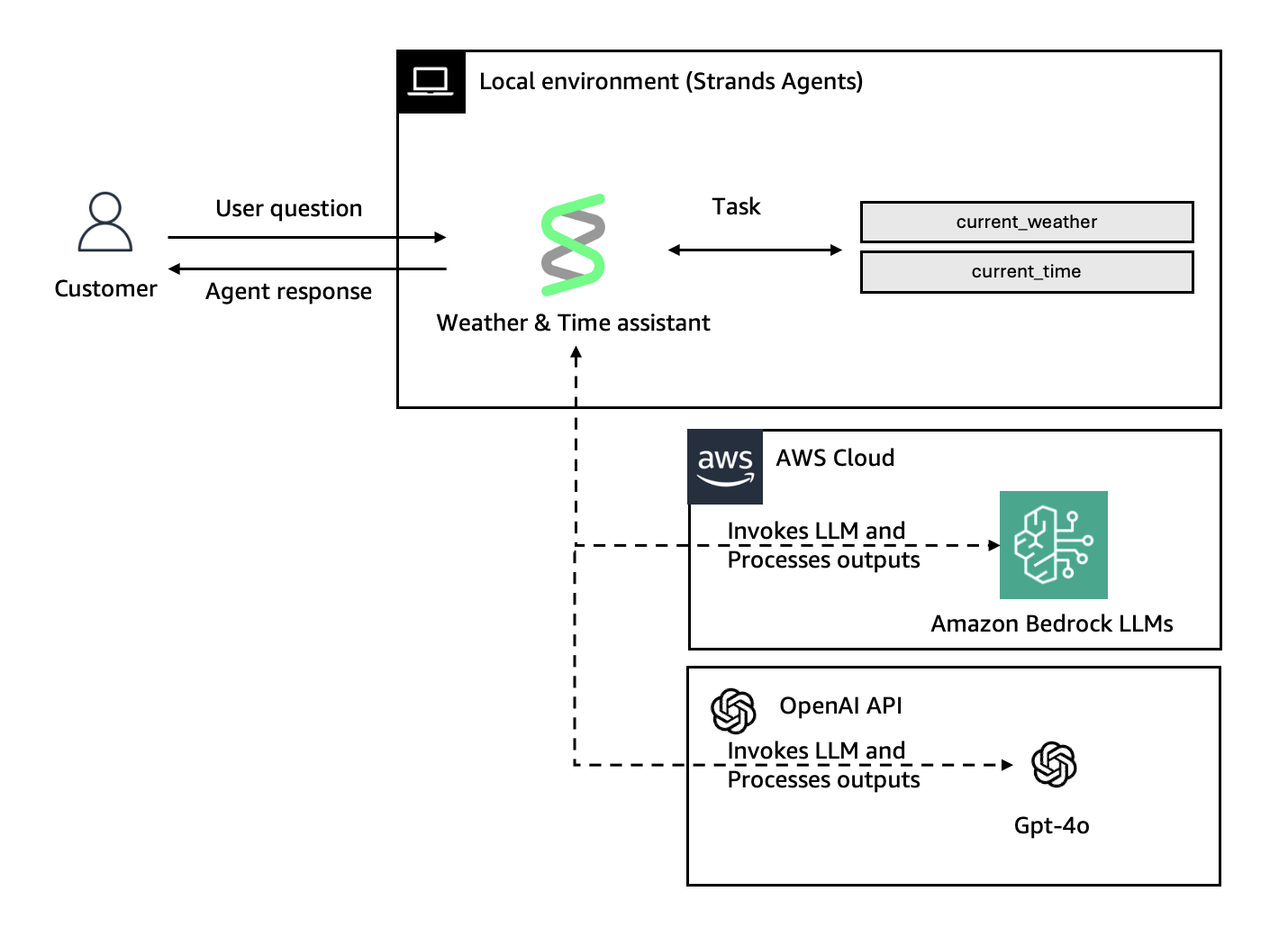
Creates a time & weather assistant that:
- Works with both AWS Bedrock and OpenAI model providers
- Demonstrates model configuration (temperature, maxTokens, modelId)
- Provides simple tools (current time and weather)
Project Structure
src/├── index.ts # CLI entry point, conversation loop└── agent.ts # Agent configuration with model providersModel Providers
Bedrock Model
Uses AWS Bedrock with Claude Sonnet 4.5:
import { BedrockModel } from '@strands-agents/sdk';
const bedrockModel = new BedrockModel({  region: 'us-east-1',  modelId: 'global.anthropic.claude-sonnet-4-5-20250929-v1:0',  maxTokens: 1024,  temperature: 0.7});
Configuration Options:
region- AWS region for Bedrock servicemodelId- Bedrock model identifiermaxTokens- Maximum tokens to generatetemperature- Controls randomness (0-1)topP- Nucleus sampling parametercachePrompt- Prompt caching strategy- …
OpenAI Model
Uses OpenAI GPT-4o:
import { OpenAIModel } from '@strands-agents/sdk/models/openai';
const openaiModel = new OpenAIModel({  modelId: 'gpt-4o',  apiKey: process.env.OPEN_AI_API_KEY,  temperature: 0.7,  maxTokens: 1024});
Configuration Options:
modelId- OpenAI model identifier (required)apiKey- OpenAI API key (or use OPENAI_API_KEY env var)maxTokens- Maximum tokens to generatetemperature- Controls randomness (0-2)topP- Nucleus sampling parameter- …
Getting Started
Prerequisites
- Node.js 22+ (the version
@strands-agents/sdksupports) - AWS credentials (for Bedrock)
- OpenAI API key (for OpenAI)
Installation
npm installConfiguration
For Bedrock:
export AWS_ACCESS_KEY_ID=your_access_keyexport AWS_SECRET_ACCESS_KEY=your_secret_keyexport AWS_REGION=us-east-1For OpenAI:
export OPEN_AI_API_KEY=your_openai_api_keyBuild
npm run buildRun
Run with Bedrock (default):
npm start bedrockRun with OpenAI:
npm start openaiTesting the Agent
Try these prompts:
- Check time: “What time is it in Paris?”
- Check weather: “What’s the weather in London?”
- Combined: “Tell me the time and weather in Tokyo”
- Exit: Type “exit”
The agent will identify itself based on the provider you selected and use the appropriate model to respond.
Key Takeaways
- Strands Agents supports multiple model providers
- Each provider has its own configuration options
- Model parameters like temperature and maxTokens control generation behavior
- You can switch providers without changing your agent logic
- OpenAI requires separate import:
@strands-agents/sdk/models/openai - Bedrock is exported from main package:
@strands-agents/sdk