Dynamic UI
View the complete sample on GitHub
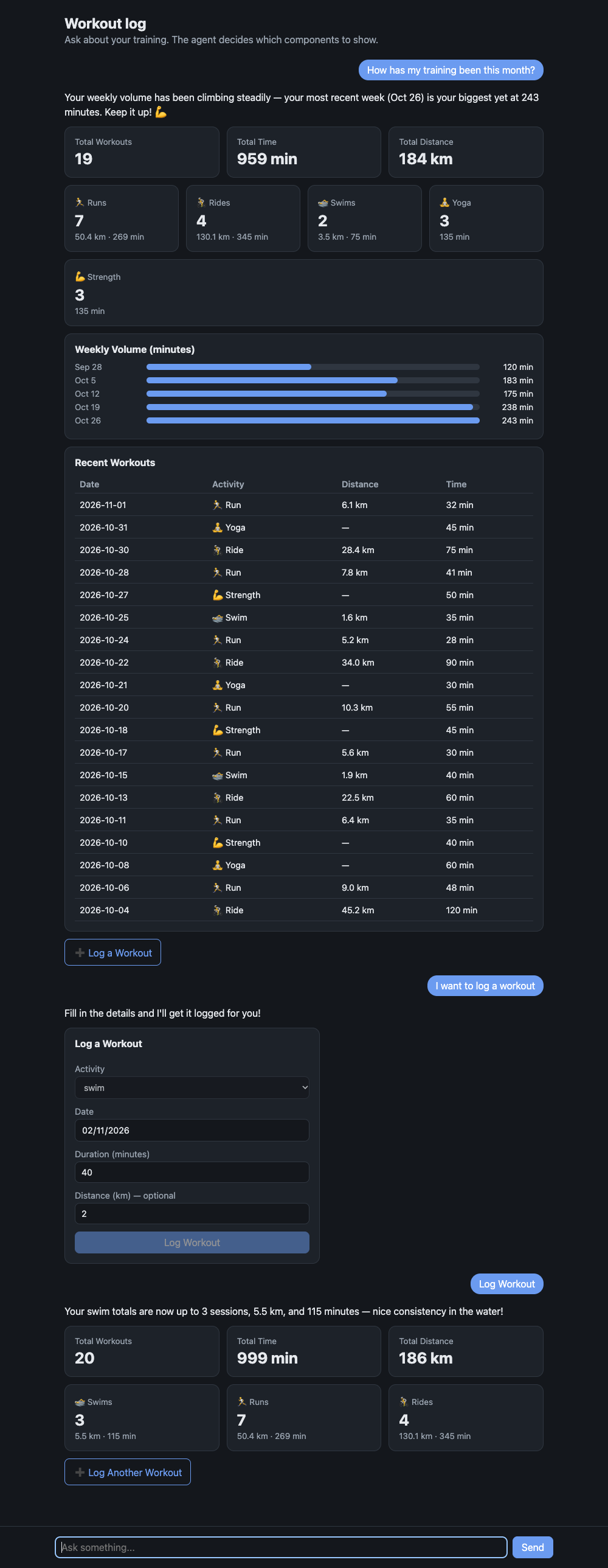
An agent that answers with UI, not just text. You ask a question, the agent picks components from a catalog the app defines (stats, charts, tables, forms, buttons), and the browser renders them. When someone submits a form or clicks a button, the interaction goes back to the agent, which acts on it and renders again.
The sample is a small workout log, but the pattern carries over to any app: define your components as a schema, give the agent a tool that takes that schema, and render what it sends.
Overview
Sample Details
| Information | Details |
|---|---|
| Agent Architecture | Single-agent |
| Native Tools | None |
| Custom Tools | render_ui, list_workouts, summarize_workouts, log_workout |
| MCP Servers | None |
| Use Case Vertical | Generative UI |
| Complexity | Basic |
| Model Provider | Amazon Bedrock |
| SDK Used | Strands Agents SDK (TypeScript), Express, Zod |
Architecture
sequenceDiagram participant B as Browser (web/app.js) participant S as Express (src/server.ts) participant A as Strands agent (src/agent.ts) B->>S: POST /api/chat { chat, message } S->>A: agent.invoke(message) A->>A: list_workouts / summarize_workouts A->>A: render_ui(components) - validated against src/catalog.ts A-->>S: reply text + rendered components S-->>B: { text, ui } B->>B: one renderer per component type B->>S: form submit / button click as "[ui action] ..." messageKey Features
- The schema is the contract.
src/catalog.tsdefines every component with Zod. That schema is therender_uitool’s input, so the model can only produce components your app supports, and Strands validates them before your code sees them. The same schema gives you theComponentTypeScript type. - The agent chooses the layout. Different questions get different UI: totals become stat cards, trends become a bar chart, lists become a table, and “I want to log a workout” becomes a form.
- Interactive round trip. Forms and buttons carry an
actionname. Interactions come back to the agent as a chat message, so it can log the workout and render an updated view. - No frontend build. The client is plain HTML and JavaScript. It renders with DOM APIs and text nodes only, so model output can’t inject markup.
Prerequisites
- Node.js 20+
- AWS credentials configured, with model access to the Strands default model on Amazon Bedrock (Claude Sonnet)
Setup
npm installUsage
npm startOpen http://127.0.0.1:8000. The server only listens on 127.0.0.1 and has no authentication, so it’s for local use. Set PORT to change the port.
Example Queries
- “How has my training been this month?” (stats, a weekly bar chart and a table)
- “Show my runs from the last two weeks” (a table)
- “I want to log a workout” (a form; submit it and the agent logs the workout and shows the updated totals)
How It Works
1. Define the catalog (src/catalog.ts). Each component is a Zod object with a type literal, combined into a discriminated union. Descriptions are written for the model, because they end up in the tool schema.
const stat = z.object({  type: z.literal("stat"),  label: z.string(),  value: z.string().describe("The headline number, formatted for display, e.g. '42 km'."),});
export const component = z.discriminatedUnion("type", [text, stat, table, barChart, form, button, row]);
2. Give the agent a render_ui tool (src/agent.ts). The tool’s only job is to collect validated components for the current turn.
tool({ name: "render_ui", description: "Show UI components to the user, in order, below your reply.", inputSchema: z.object({ components: z.array(component) }), callback: ({ components }) => { this.ui.push(...components); return "Shown to the user. Now write your short reply."; },});3. Return the components with the reply. Chat.send() runs the agent and returns { text, ui }.
4. Render by type (web/app.js). A lookup table maps each type to a function that builds DOM. Unknown types are skipped.
5. Send interactions back. A form submit becomes a message like [ui action] log_workout {"activity": "swim", "minutes": "40"}, and the system prompt tells the agent how to handle it.
Using This in Your Own App
- Replace
src/catalog.tswith the components your design system already has, and keep the props small and display-ready (formatted strings rather than raw values the client has to format). - Write the renderer in your own frontend framework. In React it’s the same lookup table with a component per
type, typed with the exportedComponenttype. - Do calculations in tools rather than letting the model do arithmetic. Here,
summarize_workoutscomputes every total and the prompt tells the agent to use it. - To render while the model is still writing, switch from
agent.invoke(...)toagent.stream(...)and forward the tool input as it streams. - Each chat keeps its agent in server memory and the workout log isn’t persisted, which keeps the sample short. A real app would add a session manager and a database.
Project Structure
| File | Purpose |
|---|---|
src/catalog.ts | Component catalog (Zod schema) |
src/agent.ts | System prompt, render_ui tool, and Chat wrapper |
src/tools.ts | Workout data tools |
src/server.ts | Express app: POST /api/chat and static files |
web/ | Browser client and renderer |
data/workouts.json | Sample workouts, with dates relative to today |
A Python version of this sample lives in python/07-ux-demos/dynamic-ui and uses the same web client.
Additional Resources
- Custom tools: defining tools like
render_uiwith typed input schemas - Streaming: rendering components while the model is still writing
- Session management: persisting conversations across restarts
- AG-UI and CopilotKit sample: tool-based generative UI with a protocol and frontend framework
Disclaimer
This sample is provided for educational and demonstration purposes only. It is not intended for production use without further development, testing, and hardening.