Express Chatbot
View the complete sample on GitHub
A Node.js + Express chatbot service built on the Strands Agents TypeScript SDK. It exposes a streaming chat API over Server-Sent Events (SSE), defines its tools with Zod, keeps per-session conversation history, loads extra tools from a remote MCP server (the public AWS Knowledge MCP Server by default), and applies interventions for rate limiting and content moderation.
Overview
| Information | Details |
|---|---|
| Agent Architecture | Single-agent |
| Native Tools | None |
| Custom Tools | get_current_time, calculate, get_weather (Zod input schemas) |
| MCP Servers | AWS Knowledge MCP Server (default; public, no auth) — configurable via MCP_SERVER_URL |
| Use Case Vertical | General-purpose / developer starter |
| Complexity | Intermediate |
| Model Provider | Amazon Bedrock |
| SDK Used | Strands Agents TypeScript SDK |
Architecture
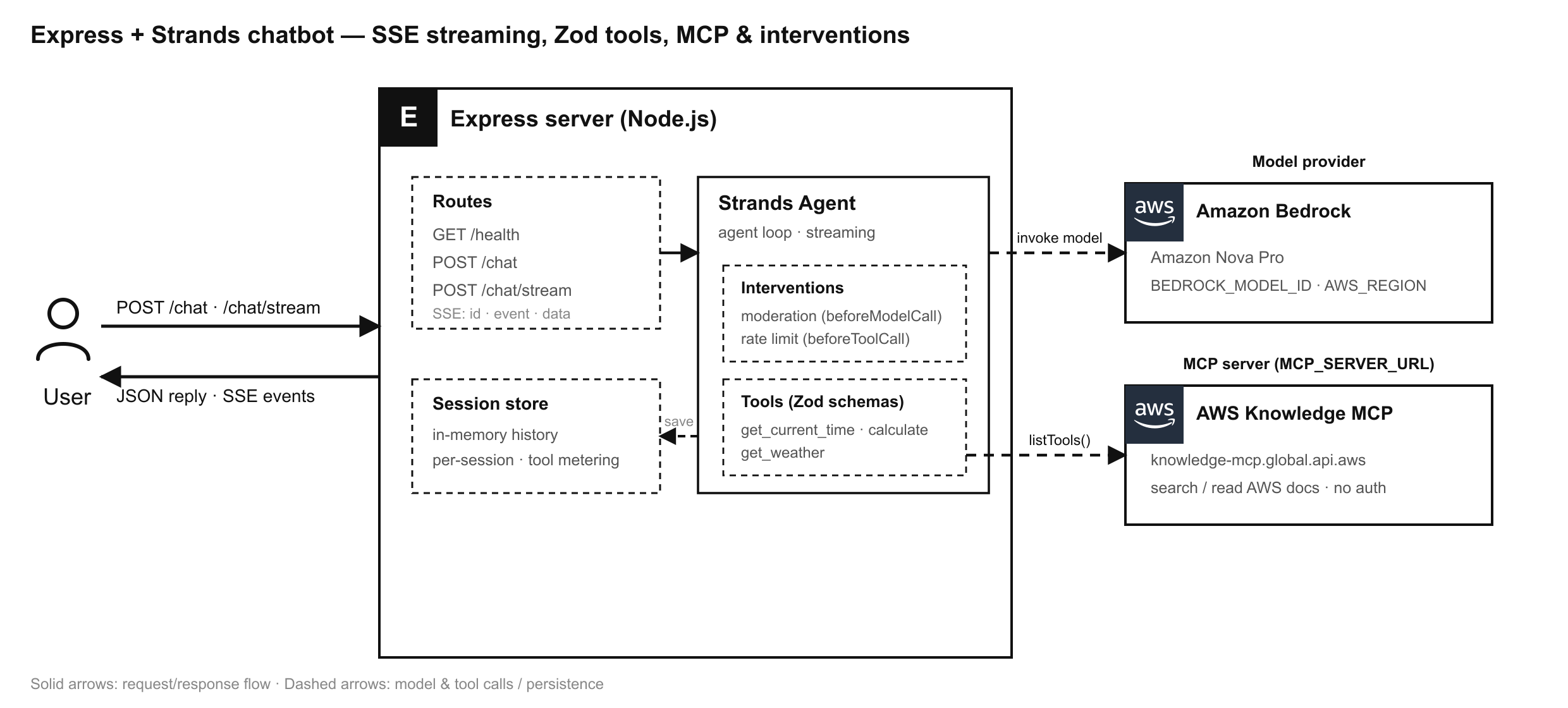
The user talks to an Express server that runs a Strands Agent per turn. The agent applies a moderation intervention before each model call and a rate-limit intervention before each tool call, calls the local Zod tools (plus the tools loaded from a remote MCP server at startup), and invokes Amazon Bedrock for inference. By default the MCP client connects to the public AWS Knowledge MCP Server, so the agent can search and read up-to-date AWS documentation. Conversation history is persisted per session and replayed on the next turn. Responses are returned as JSON (/chat) or streamed as Server-Sent Events (/chat/stream).
Key Features
- SSE streaming with event ids —
POST /chat/streamforwards every agent event as its own SSE message with an incrementingid:line, so clients can track position and reconnect withLast-Event-ID. - Zod tools — three custom tools whose inputs are validated by Zod schemas before the callback runs.
- Session store — an in-memory store keeps per-session conversation history, replayed into the agent on every turn so the chatbot is stateful.
- MCP client — connects to a remote MCP server at startup and loads its tools alongside the local ones. Defaults to the public AWS Knowledge MCP Server (no credentials required), which exposes tools to search and read official AWS documentation.
- Interventions — a rate-limit intervention caps tool calls per session, and a moderation intervention blocks configured terms before the model is called.
Prerequisites
- Node.js 18.x or later
- AWS account with Amazon Bedrock model access for the configured model (default:
us.amazon.nova-pro-v1:0) - AWS credentials available via the default credential chain (environment variables, shared config/credentials file, SSO, or an IAM role)
Setup
-
Configure environment variables:
Terminal window cd typescript/01-learn/07-express-chatbotcp .env.example .env# Edit .env with your AWS region, model id, and optional MCP/rate-limit/moderation settings -
Install dependencies:
Terminal window npm install
Usage
Start the server (development, auto-reload):
npm run devOr build and run:
npm run buildnpm startThe server listens on http://localhost:3000 (configurable via PORT).
Endpoints
| Method & Path | Description |
|---|---|
GET /health | Liveness check and live session count |
POST /chat | Non-streaming turn; returns the final reply as JSON |
POST /chat/stream | Streaming turn over Server-Sent Events |
Both chat endpoints accept a JSON body { "message": string, "sessionId"?: string }. Omit sessionId on the first turn — the response returns a new session id you can reuse to continue the conversation.
Non-streaming request:
curl -X POST http://localhost:3000/chat \ -H 'Content-Type: application/json' \ -d '{"message": "What time is it in Tokyo?"}'Streaming request (SSE):
curl -N -X POST http://localhost:3000/chat/stream \ -H 'Content-Type: application/json' \ -d '{"message": "What is 21 * 2, and what is the weather at 48.85,2.35?"}'Each SSE message looks like:
id: 3event: contentBlockEventdata: {"type":"contentBlockEvent","contentBlock":{ ... }}The first event is always a session event carrying the sessionId, and the stream ends with a done event (or an error event if the turn failed).
Example Queries
- “What time is it in
America/New_York?” - “Calculate 128 divided by 4.”
- “What’s the current weather at latitude 51.5, longitude -0.12?”
- “Search the AWS docs for how Amazon Bedrock model access works.” (uses the AWS Knowledge MCP tools)
Project Structure
| Component | File(s) | Description |
|---|---|---|
| Configuration | src/config.ts | Reads settings from environment variables |
| Custom tools | src/tools/chatTools.ts | Three Zod-validated tools |
| Session store | src/sessions/SessionStore.ts | In-memory per-session history and rate-limit metadata |
| MCP client | src/mcp/mcpTools.ts | Optional MCP connection and tool loading |
| Rate-limit policy | src/interventions/RateLimitIntervention.ts | Caps tool calls per session per time window |
| Moderation policy | src/interventions/ModerationIntervention.ts | Blocks configured terms before the model call |
| Agent factory | src/agent.ts | Builds a per-turn agent seeded with session history |
| HTTP server | src/server.ts | Express app with /health, /chat, /chat/stream |
| Entry point | src/index.ts | Loads env, connects MCP, starts the server |
Configuration
| Variable | Default | Description |
|---|---|---|
PORT | 3000 | HTTP port |
AWS_REGION | us-east-1 | Region for the Bedrock model |
BEDROCK_MODEL_ID | us.amazon.nova-pro-v1:0 | Bedrock model id |
MCP_SERVER_URL | https://knowledge-mcp.global.api.aws | Streamable HTTP MCP server URL. Defaults to the AWS Knowledge MCP Server; set to empty to disable MCP |
RATE_LIMIT_MAX_TOOL_CALLS | 10 | Max tool calls per session within the window |
RATE_LIMIT_WINDOW_MS | 60000 | Rate-limit window in milliseconds |
MODERATION_BLOCKED_TERMS | (empty) | Comma-separated blocked terms (case-insensitive) |
Testing
A smoke test verifies the pieces that do not require Bedrock credentials (tool registration, moderation, rate limiting, and the HTTP layer):
npm run smokeType-check the project:
npm run typecheckTroubleshooting
| Symptom | Likely Cause | Fix |
|---|---|---|
Stream emits an error event immediately | Missing/invalid AWS credentials | Configure AWS credentials and Bedrock model access |
AccessDeniedException from Bedrock | Model access not enabled for your account | Enable access for the model id in the Bedrock console |
| MCP tools not loaded | MCP_SERVER_URL unset or unreachable | Set a reachable Streamable HTTP MCP server URL in .env |
429-style refusal in replies | Rate limit reached for the session | Raise RATE_LIMIT_MAX_TOOL_CALLS or widen RATE_LIMIT_WINDOW_MS |
Additional Resources
- Strands Agents Documentation
- TypeScript API Reference
- Model Context Protocol
- AWS Knowledge MCP Server
- Server-Sent Events (MDN)
Disclaimer
This sample is provided for educational and demonstration purposes only. It is not intended for production use without further development, testing, and hardening. The moderation intervention uses simple substring matching for illustration — replace it with a real moderation service before relying on it. For production, back the session store with a shared store and add appropriate authentication, input validation, and observability.